BeanStalk Plugin

c0nf0uNdS

Frequency without boundaries. Dissolve what is. Reinforce what remains.

DELTA frequency sculpting

Dissolve what is. Reinforce what remains.

c0nf0uNdS puts seven frequency nodes on one graph. Drag a node up to reinforce that region of the sound, down to dissolve it, or sideways to move its centre frequency. The centre line is dry.

Get c0nf0uNdS on Gumroad Pay what you want · free · VST3 · Windows + Linux · more platforms may follow
c0nf0uNdS
Built byBean.S.talk · BeanStalk Audio
Statusv0.1.1 · Windows + Linux. More platforms may follow.
What is it?

So, what does it do?

It is not a conventional EQ: a node's influence is a signed percentage, and reinforcing and dissolving need not be symmetrical in level. The processing is driven by the signal's own activity in each region, using the engine from c0nfIneS.

Each node has Frequency, Influence, Width and Character. Character starts at 0% and changes how the engine responds to activity; boost/cut and Width remain the main controls. Solo plays the signed difference you are adding.

Curious how it works?
The Concept

Distance from the line is influence.

The graph is frequency across and influence up and down. The line in the middle is dry; the farther a node sits from it, the stronger its effect. The small balls at each end of a node set its Width. The signal-activity engine is the c0nfIneS engine, with this plugin's own wrapper; its output is bit-identical to the frozen core in our tests.

Click the centred <i0i> to open a live analyzer of input (grey) and output (blue) levels in dBFS. It shows real signal spectra, not a promised EQ curve, and it stops working while hidden.

Signal Path

Seven nodes, one engine.

The input goes through the seven nodes in order; Trim sets the final level. Solo plays the difference between the processed and dry signals.

c0nf0uNdS signal flow: input, seven frequency nodes (Frequency, Influence, Width, Character each) in order, Trim, output; Solo plays the difference from dry.
Seven node regions along the engine, then Trim.
Controls

Seven nodes, a trim, a solo.

Node dragup / down / sidewaysUp reinforces, down dissolves, sideways moves the centre frequency. Double-click resets influence to neutral.
Wheelover a nodeBoost / cut influence. Ctrl-wheel: Width. Alt-wheel: Character. Shift: finer.
Width ballsdragThe end balls of a node set its width.
Value editorclick the sproutShows exact Frequency, Influence, Width and Character, editable. Hidden by default.
TrimdBFinal level, independent of node positions.
SolotogglePlays the signed processing difference.
PowerbypassBypasses processing.
<i0i>glyphOpens the live input / output analyzer.
Interface

Blue on near-black, the nodes in colour.

Seven coloured nodes sit on a log-frequency graph. Numbers stay hidden until you click the sprout. The analyzer drawer gives its height back when closed. Uniform scaling with a minimum and maximum size.
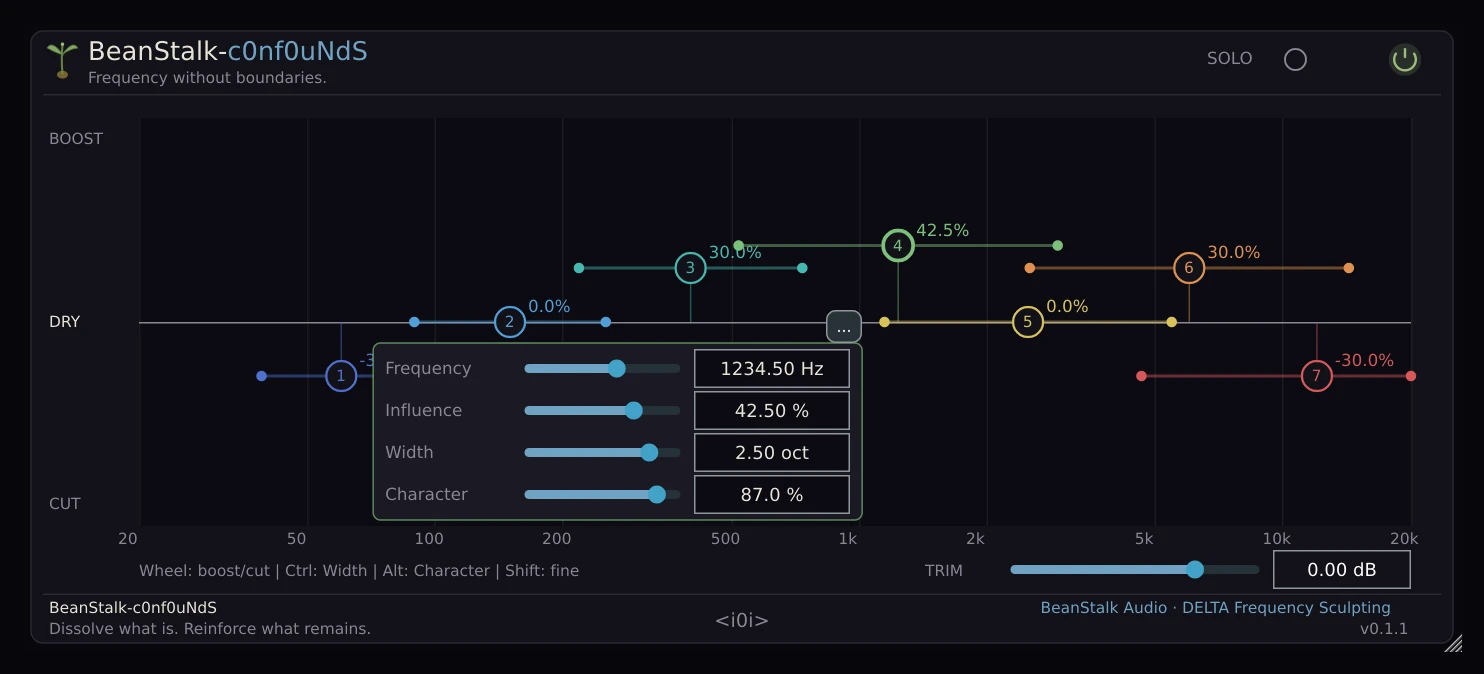
The BeanStalk-c0nf0uNdS front panel: title with a blue 'c0nf0uNdS', SOLO and a power icon; a log-frequency graph from 20 Hz to 20 kHz with BOOST, DRY and CUT, seven numbered coloured nodes with width bars, and an open value popup for node 4 (Frequency, Influence, Width, Character); TRIM slider and the footer with <i0i> and v0.1.1.
The front panel with the value editor open on node 4 (the plugin's own editor rendered headless; demo settings).
A few things to know before you download
What it isn't

Read this before you download.

Percent, not decibelsInfluence is a signed percentage, not EQ gain. Reinforcing and dissolving need not change the level symmetrically.
Not an EQ curveThe analyzer shows the actual signal levels, not a promised response.
Host shortcutsSome hosts or desktops intercept modifier-wheel shortcuts. Width balls and the value editor are direct alternatives.
Not yet checkedWindows host and Windows high-DPI checks have not been done by us.
Technical details and verified specs
Technical

Verified specifications.

FormatVST3
Operating systemsWindows (64-bit) · Linux (64-bit)
Nodes7, each with Frequency, Influence, Width, Character
ChannelsMono or stereo
Sample ratesTested at 44.1 / 48 / 88.2 / 96 / 176.4 / 192 kHz
NeutralInfluence 0 = dry
Linux build floorglibc 2.36, x86-64-v2
Version0.1.1

Frequency without boundaries.

VST3, Windows and Linux. More platforms may follow.

Get c0nf0uNdS on Gumroad

More BeanStalk plugins

See all plugins →