BeanStalk Plugin

F0RGE

Shape a mix with several character paths, then see what changed. F0RGE puts the sound and the measurements in one place.

Mastering / Texture

Shape it. Measure it. Listen.

F0RGE combines several processing paths into one stereo tool. Use the main controls to find the character, then open the measurements to see what the chain is doing.

Get F0RGE on Gumroad Pay what you want · free · VST3 + Standalone · Windows + Linux
F0RGE
Built byBean.S.talk · BeanStalk Audio
StatusReleased · v2.8.3 · Windows + Linux — more platforms may follow
What is it?

So, what does it do?

F0RGE puts several character tools in one place. Shape the sound, compare what changed, and keep what you like.

Curious how it works?
The Concept

Six contributions, one signal — and a number on each.

Most character processors are a black box: you turn things up until it sounds right and hope you didn't wreck the phase or collapse the stereo image doing it. F0RGE's premise is that you shouldn't have to hope. Its metering pipeline runs alongside the audio and quantifies six distinct contributions to what you hear — Edge, Mass, Bite, Temper, Space and Stereo — plus loudness difference against dry, phase correlation, crest factor, and a three-part Width Confidence score built from mid/side energy, mono compatibility and peak-cancellation behaviour.

That means you can push the character hard and immediately see whether the width you gained is real width or a mono-compatibility problem waiting to happen — before it reaches a client, a streaming encoder, or a club system. The metering is read-only and fully gated: when the Lab drawer is closed its audio-thread computation doesn't run at all, so you only pay for it while you're looking.

F0RGE's DSP is a verbatim port of an older BeanStalk stereo character engine; the JUCE rebuild changed the wrapper and the interface, not the sound. Several stages carry Airwindows-lineage algorithms (the Edge slew stage, the character clip). One inherited trait is retained deliberately — see "What it isn't" below.

Signal Path

Two parallel branches, crossfaded, then measured.

The input is conditioned, split into three character streams and a colour engine, then run down two parallel branches — one streams-only, one with the full Studio chain. Studio crossfades between them (Solo swaps to their difference); Delta balances the result against dry; Trim, an optional clip and a fixed output filter finish it. A non-defeatable safety ceiling bounds the final output no matter how the controls are set.

DRY — host Bypass returns this untouched, delayed to match 2-sample latency MID / SIDE SENDS STREAMS + TEMPER STUDIO x-fade · SOLO = difference IN STEREO HYPERSONIC FIXED · ALWAYS ON SPLIT → 2 BRANCHES EDGE SLEW · AMT + SEND MASS 26-STAGE SUB · AMT + SEND BITE SATURATOR · AMT + SEND SUM TEMPER M/S PITCH-SHIFT + REGEN DELAY BOUNDS HP/LP WINDOW BRANCH 1 streams + Temper BRANCH 2 + Sonicplain + Space SONICPLAIN → SPACE M/S SAT + TAME · RND DELAY STUDIO / SOLO CROSSFADE OR DIFFERENCE DELTA DRY ↔ FULL CHAIN TRIM L/R/MID/SIDE/MASTER CLIP OPTIONAL ULTRASONIC FIXED · ALWAYS ON MATCH AUTO-GAIN → DRY LUFS SAFETY CEILING ≈ −0.5 dBFS · NON-DEFEATABLE OUT LAB — read-only metering samples every stage boundary · fully gated when the drawer is closed
Edge / Mass / BiteThree parallel character streams — a slew/transient emphasis, a 26-stage cascaded sub-bass shaper, and a multi-stage saturator — each with its own Amount and a bipolar Mid/Side send into Temper.
TemperA dual Mid/Side pitch-shift and regenerative-delay engine ("Color" in F0RGE's own meters). Time, Regen, Aim, Focus, Pitch and Blend shape how much harmonic movement folds back in.
Two branches, one Studio knobBranch 1 is streams + Temper; branch 2 adds Sonicplain (Mid/Side saturation with a "Tame" filter) and Space (randomised per-channel micro-delay). Studio crossfades between them; Solo swaps to their difference for A/B.
Delta, Trim, then the finishDelta crossfades the whole processed result against dry. Trim does five-way L/R/Mid/Side/Master staging. An optional slew-aware Clip, a fixed Ultrasonic filter, and Match (feed-forward auto-gain toward the dry loudness) follow.
The safety ceilingA non-defeatable clip near −0.5 dBFS is the literal last stage — it bounds the output regardless of Trim, Match, Studio or the optional Clip. It has no control and can't be turned off.
Bypass vs. Delta 0Host Bypass returns the untouched dry signal (bit-exact, delayed to match F0RGE's 2-sample latency) — the only null-identical reference. Delta at 0 is a low-processing patch, not a bypass: the always-on filters, Trim and Match still run.
Controls

Four on the panel. The rest in the Studio drawer.

DELTA0–100%, default 0The master dry-to-processed macro. At 0 you hear an almost-dry signal (the always-on filters, Trim and Match still run); as you raise it the full character chain crossfades in.
EDGEAmount 0–100% + Mid/Side sendSlew/transient emphasis — adds attack, grit and forwardness. The send pushes Edge's output toward the Mid or the Side before it reaches Temper.
MASSAmount 0–100% + Mid/Side sendA deep cascaded sub-bass shaper. Adds low-end weight and body; the send places that weight in the centre or the sides.
BITEAmount 0–100% + Mid/Side sendA multi-stage saturator for harmonic edge and density. Higher settings make the distortion character increasingly obvious.
STUDIO0–100%, default 50%, reads "STUDIO n%"Crossfades branch 1 (streams + Temper only) into branch 2 (which adds Sonicplain and Space). It's how much of the full Studio chain is in the sound.
SOLOpanel toggleSwaps the branch crossfade for the difference between the two branches — an A/B that isolates exactly what the Studio chain is adding.
TEMPER — Time / Regen / Aim / Focus / Pitch / BlendStudio drawerThe colour engine. Time and Regen set the delay and feedback of the regeneration; Aim (≈4 Hz–17.6 kHz) and Focus (Q 0.01–1.01) tune its internal resonance; Pitch sets the Mid/Side shift; Blend sets how much of it returns.
SPACE — Left / Right / Random / BlendStudio drawerA short randomised per-channel delay (1 µs–50 ms per side, log). Random modulates the times; Blend sets the wet amount. Widens and destabilises the stereo image.
SONICPLAIN — Unleash / Tame / SettleStudio drawerMid/Side field saturation (branch 2). Unleash drives it, Tame is an IIR filter that reins in the low end it generates, Settle controls how hard it clamps.
BOUNDS — Floor / CeilingStudio drawerA tunable frequency window. Floor is a high-pass (20 Hz–2 kHz, off at minimum); Ceiling is a low-pass (20 kHz down to 200 Hz, off at minimum). Applied per branch.
TRIM — Left / Right / Mid / Side / MasterStudio drawer, ±12 dB each, centre-detentedFinal gain staging on the blended signal — independent Left, Right, Mid and Side control plus an overall Master, for matching output level against bypass.
CLIPStudio drawer toggle, off by defaultAn optional slew-aware character clipper. The permanent safety ceiling (near −0.5 dBFS) is separate, always on, and has no control.
MATCHhost parameter, locked at 95%Feed-forward auto-gain that pulls the processed loudness toward the dry signal's, so an A/B is about character, not level. Automatable from the host; no panel widget.
The bean-sprout marktop-left, all three surfacesA global readout toggle — hides or shows every numeric value across the front panel and both drawers at once.
The LAB drawerLAB button — off by defaultRead-only diagnostics: Loudness, Image, Dynamics, a per-stage Contribution breakdown (Edge/Mass/Bite/Temper/Space/Stereo), a three-part Width Confidence score, and CPU. No audio-thread cost while it's closed.
BYPASSheader power lightTrue DSP bypass — returns the untouched dry input, delayed to match the 2-sample latency. The only bit-exact reference.
A closer look at the controls
The Interface

Muted green, a gold thread. Part of the BeanStalk family.

F0RGE uses the shared BeanStalk vector panel with a dark, warm-leaning cast and a muted-green identity, gold running through it as the family state colour. The host-docked front panel is deliberately small — DELTA, the EDGE / MASS / BITE streams with their send lines, and STUDIO — with STUDIO and LAB buttons opening two independent, drag-resizable drawers. Everything is drawn with vector primitives: no baked knob art, no skin images.
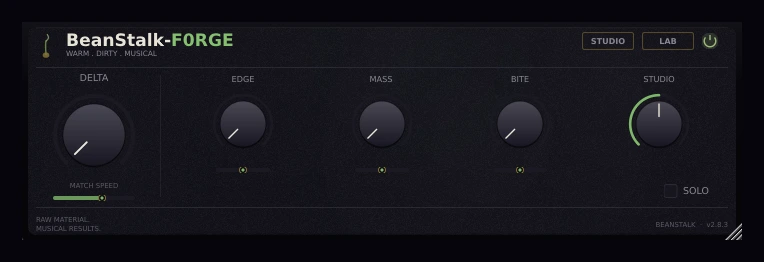
The BeanStalk-F0RGE front panel: a wide, short near-black bar. Top-left a small gold bean-sprout mark; the title 'BeanStalk-F0RGE' with 'F0RGE' in muted green and the subtitle 'WARM . DIRTY . MUSICAL'. Top-right, STUDIO and LAB buttons and a power light. A large DELTA knob on the left with a thin 'MATCH SPEED' slider beneath it, then EDGE, MASS and BITE knobs each with a small bipolar send indicator below, and a STUDIO knob on the right with a bright green value arc. 'RAW MATERIAL. MUSICAL RESULTS.' bottom-left, a SOLO checkbox and 'BEANSTALK · v2.8.3' bottom-right.
The front panel — DELTA, the three character streams with Mid/Side sends, and STUDIO. Host-docked and compact by design.
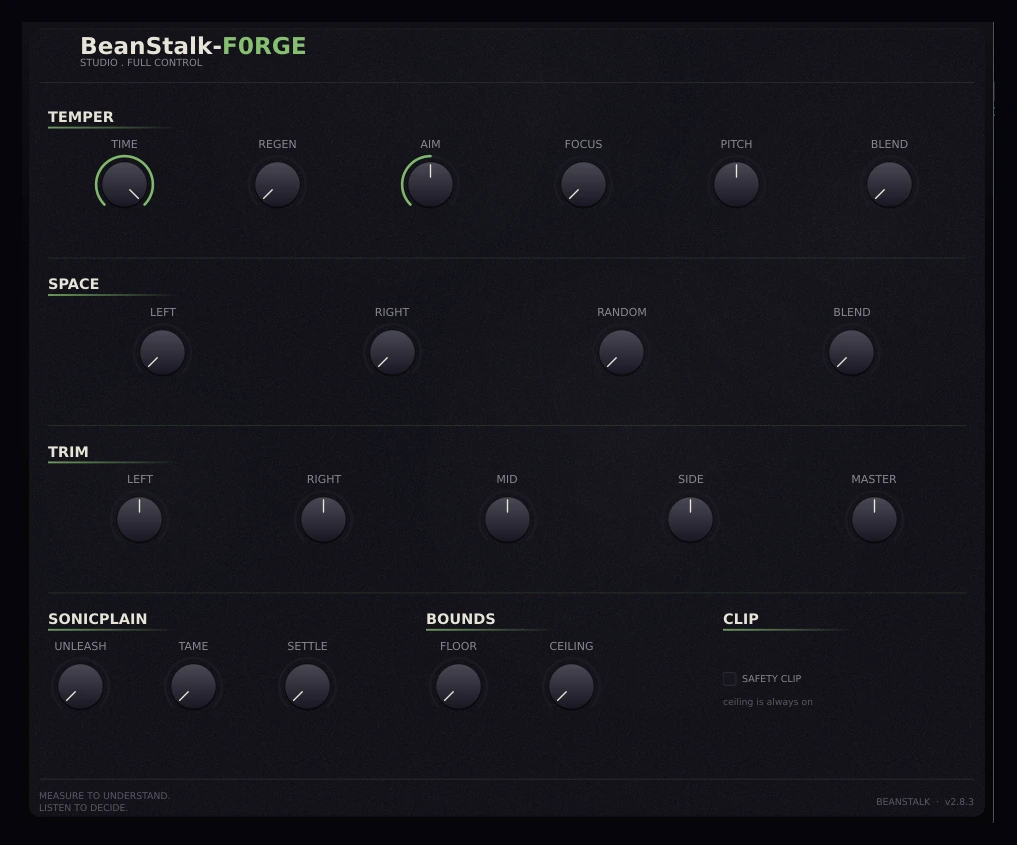
The F0RGE Studio drawer: a single-column panel headed 'BeanStalk-F0RGE / STUDIO . FULL CONTROL'. Sections top to bottom with faint green pinstripe seams between them: TEMPER (Time, Regen, Aim, Focus, Pitch, Blend), SPACE (Left, Right, Random, Blend), TRIM (Left, Right, Mid, Side, Master), then SONICPLAIN (Unleash, Tame, Settle), BOUNDS (Floor, Ceiling) and CLIP (a 'SAFETY CLIP' checkbox with 'ceiling is always on' beneath it). Footer: 'MEASURE TO UNDERSTAND. LISTEN TO DECIDE.' and 'BEANSTALK · v2.8.3'.
The Studio drawer — Temper, Space and Trim up top; Sonicplain, Bounds and the optional Clip below.
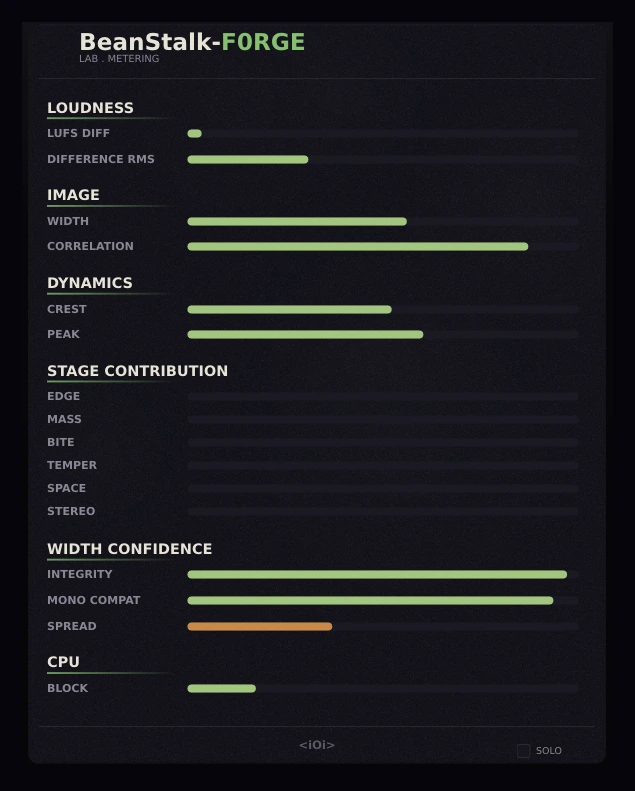
The F0RGE Lab drawer: a read-only meter bridge headed 'BeanStalk-F0RGE / LAB . METERING'. Label / bar / value rows grouped under headings: LOUDNESS (LUFS Diff, Difference RMS), IMAGE (Width, Correlation), DYNAMICS (Crest, Peak), STAGE CONTRIBUTION (Edge, Mass, Bite, Temper, Space, Stereo), WIDTH CONFIDENCE (Integrity, Mono Compat, Spread — the first two green, Spread amber), and CPU (Block). A centred '<iOi>' badge and a SOLO checkbox in the footer.
The Lab drawer — every meter reads the real signal at a stage boundary. Green bars, amber for caution, never red. Computation stops when the drawer closes.
How to use it

Where it earns its place.

Mix-bus glue and weightLow Delta, a little Mass and Bite, Studio low. Watch the Lab's Correlation and Mono Compat while you push — you get thickness without an image that falls apart in mono.
Mastering character passMatch is locked at 95%, so A/B against bypass is honest. Dial Edge/Mass/Bite by the contribution meters, use Bounds to keep the shaping out of the sub and the air, then Trim to land the level.
Drum-bus attack and sizeEdge with a Side-leaning send for transient snap that widens the kit, Space at a low Blend for depth. Settle in Sonicplain keeps the low end from ballooning.
Widening a stereo synth or padSpace (Left/Right/Random) plus Sonicplain, Studio high. The Width Confidence score tells you whether the width is real or a phase problem before you commit.
Aggressive sound designHigh Delta, Bite hard, Temper Regen up with a resonant Aim/Focus, Solo to hear just the difference the Studio chain is making. The safety ceiling keeps the output bounded while you push everything.
Just diagnosing a mixDelta at 0, open Lab. F0RGE becomes a loudness / correlation / crest / width-confidence meter bridge that costs almost nothing on the audio thread.
A few things to know before you download
What it isn't

Read this before you download.

Not a mastering limiterThe safety ceiling near −0.5 dBFS is a backstop, not a transparent brick-wall limiter. If you need competitive loudness with clean release behaviour, put a dedicated limiter after F0RGE.
Delta 0 is not a true bypassIt's a low-processing patch — the always-on Hypersonic/Ultrasonic filters, Trim and Match still run, and it differs from the true input by roughly +0.5 dB broadband. Use the host's Bypass for a null-identical reference.
The Edge/Temper character shifts with sample rateThe slew stage has no sample-rate term, so the same patch reads a few dB different at 192 kHz than at 44.1 kHz. This is a known inherited Airwindows SlewOnly trait, retained deliberately — set by ear at your session rate.
The Lab meters are approximationsLoudness is a LUFS-style approximation, not a certified meter; the contribution and width-confidence scores are F0RGE's own model of the signal, for making decisions — not for compliance reporting.
Technical details and verified specs
Technical

Verified specifications.

FormatsVST3 · Standalone application
Operating systemsWindows 10/11 (64-bit) · Linux (64-bit)
ChannelsStereo in / stereo out
Latency2 samples, constant at every sample rate
Sample ratesAny host rate; verified 44.1 / 48 / 88.2 / 96 / 176.4 / 192 kHz
BypassHost Bypass is bit-exact dry (latency-compensated). Delta at 0 is a low-processing patch, ~+0.5 dB vs. true input — not a null bypass.
Output safetyNon-defeatable safety ceiling as the final stage — worst-case output measured at −0.56 dBFS across a 1518-render matrix. No NaN/Inf or runaway under automation in testing.
OversamplingNone
MeteringLab pipeline is read-only and fully gated — zero audio-thread cost when the drawer is closed; ~0.4% of the real-time budget when open.
CPUOne character chain plus fixed conditioning filters. No published percentage.
Version2.8.3

Raw material. Musical results.

F0RGE is pay-what-you-want, and free is a fair price. VST3 and Standalone, Windows and Linux — more platforms may follow.

Get F0RGE on Gumroad

DSP Lineage & Attribution: This plugin incorporates adapted DSP components from Airwindows (Chris Johnson, MIT licensed): ClipOnly3, Monitoring3, Hypersonic, Ultrasonic, PitchDelay, EveryTrim and StereoFX. These are identified by the source headers and comments; only some have been checked stage by stage. The specific components and applicable notices are documented in the included THIRD_PARTY_NOTICES.md. This does not imply endorsement by or affiliation with Airwindows.

More BeanStalk plugins

See all plugins →