BeanStalk Plugin

s0l

Find the right tape-style pitch and speed, then render it cleanly. A live plugin for auditioning and a standalone tool for the actual varispeed file.

VST3 · Standalone · One number

Find the speed. Keep the sound.

Tape-style varispeed changes pitch and duration together. A plugin can't change your DAW's playback speed, so s0l uses two tools: the VST3 helps you find the pitch, and the standalone player renders the speed-and-pitch change.

Get s0l on Gumroad Pay what you want · VST3 + Standalone · Windows + Linux
s0l
Built byBean.S.talk · BeanStalk Audio
Statusv0.2.0 · Windows + Linux — more platforms may follow
What is it?

So, what does it do?

Tape speed changes pitch and playing time together. s0l helps you find the pitch in your DAW, then its standalone player can render the actual speed change.

Curious how it works?
The concept

Same value. Two engines.

The same short phrase at −7.00 semitones, rendered by the actual engines. The VST3's live engine drops the pitch and stays in time with the host. The offline render drops the pitch and stretches the length, like tape.
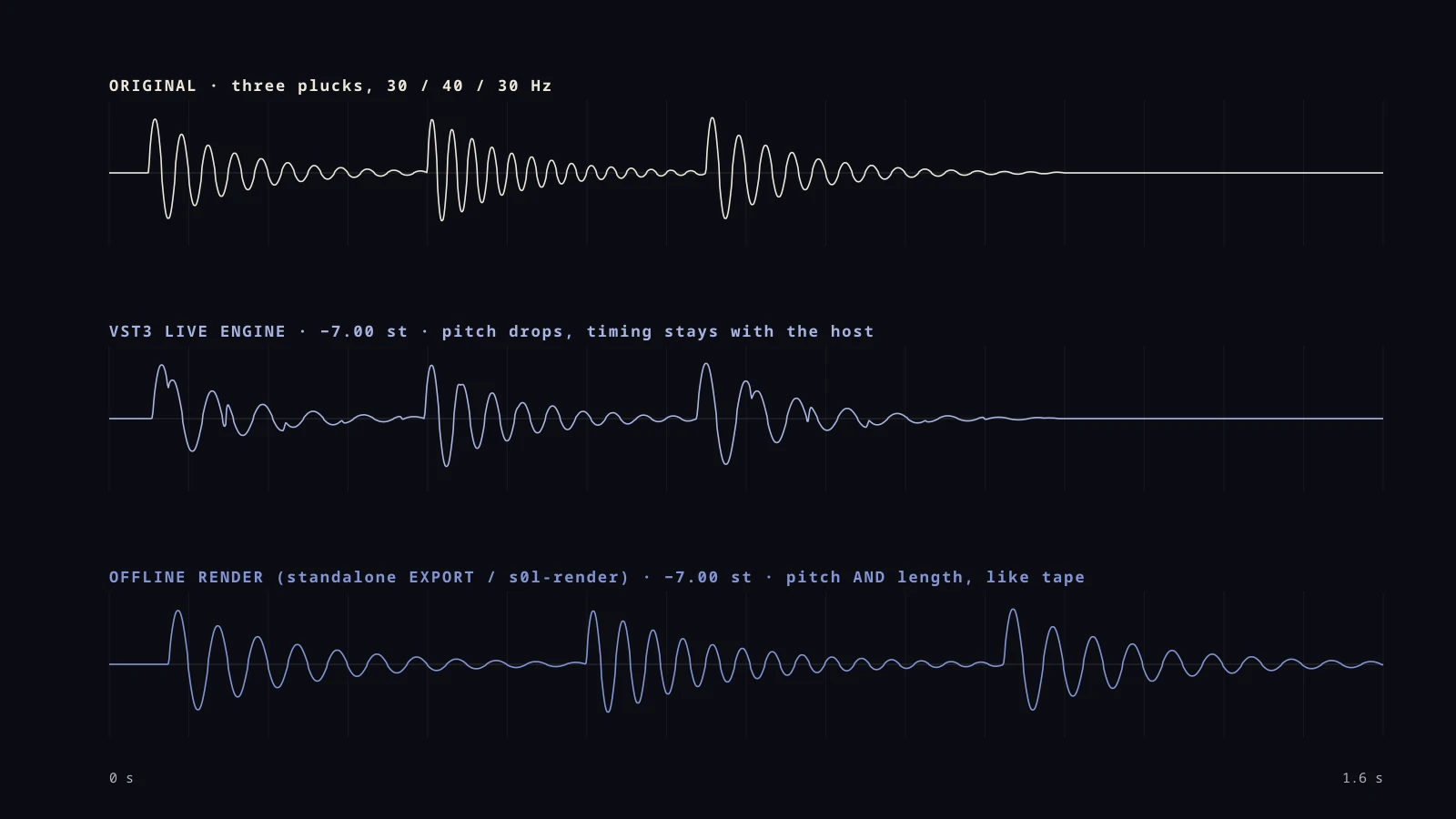
Three waveform traces on a dark background over 1.6 seconds. Top, in cream: the original, three decaying low plucks. Middle, in pale periwinkle: the VST3 live engine at minus 7 semitones, with slower cycles but the plucks at the same times, and small visible jumps where the engine splices. Bottom, in periwinkle: the offline render at minus 7 semitones, with slower cycles and the plucks spread further apart, the last one running past the end.
Real renders, not a sketch: a three-note 30 / 40 / 30 Hz pluck phrase through the plugin's live engine and the offline engine, both at −7.00 st.

Look closely at the middle trace and you can see the live engine's splices — the small jumps where it keeps up with the host. That is the audition path working as designed; the render has none.

How it fits together

Audition, then render — with one number.

Every value in s0l is a whole number of hundredths of a cent, so the plugin, the standalone and the export all use exactly the same ratio.
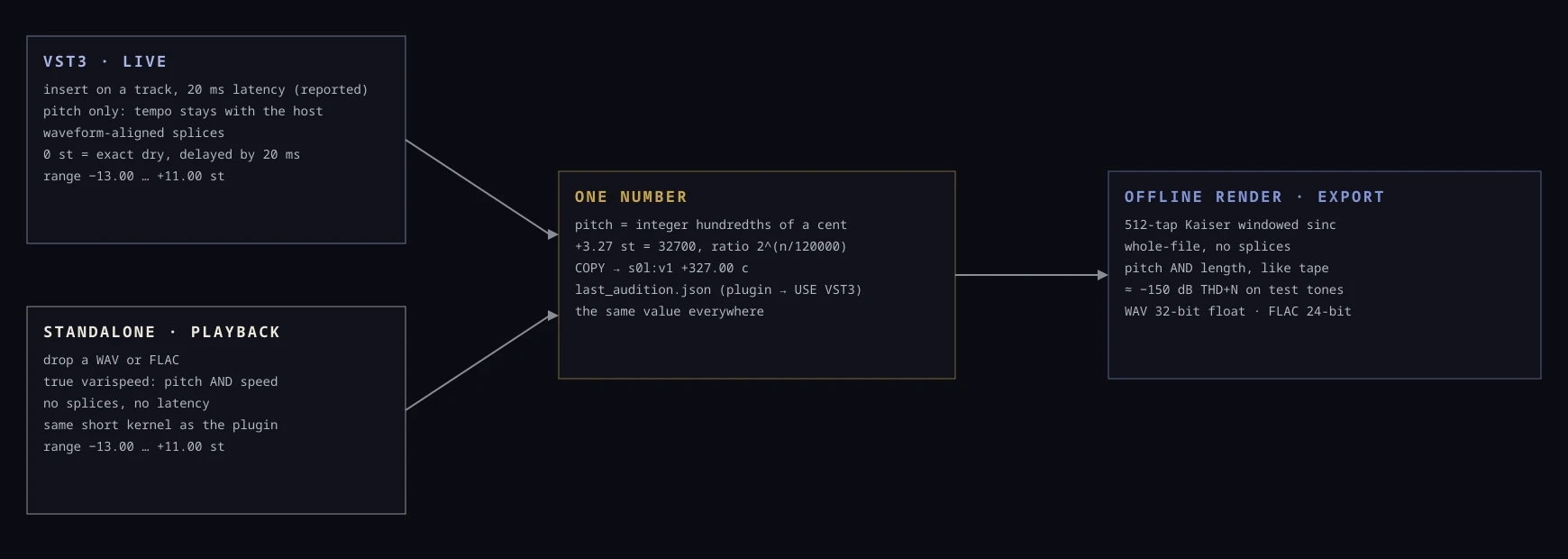
Diagram: a VST3 LIVE box (insert on a track, 20 ms latency, pitch only, waveform-aligned splices, 0 st is exact dry, range −13 to +11 st) and a STANDALONE PLAYBACK box (drop a WAV or FLAC, true varispeed, no splices, no latency) both feed a ONE NUMBER box (integer hundredths of a cent, COPY, last_audition.json, USE VST3), which feeds an OFFLINE RENDER EXPORT box (512-tap Kaiser windowed sinc, whole file, pitch and length, about −150 dB THD+N on test tones, WAV 32-bit float or FLAC 24-bit).
Pitch only, liveThe VST3 can't change your session's tempo, so it changes pitch and stays locked to the host.
20 ms, reportedA fixed latency your host compensates. At 0 it's the exact dry signal, just delayed.
The hand-offThe plugin remembers the last value you auditioned; the standalone's USE VST3 picks it up. COPY gives you it as text.
The renderA long offline filter over the whole file — no splices, about −150 dB THD+N on test tones.
Controls

One knob. One number. Export.

PITCH−13.00 … +11.00 st · 0.01 cent0 sits at 12 o'clock. Drag, or use the mouse wheel for 1-cent steps (Shift: 0.01 cent). Double-click for 0.
The readoutclick to typeType +3.27, 327c or paste s0l:v1 +327.00 c. The cents line under it is exact.
COPY · USE VST3the hand-offCOPY puts the exact value on the clipboard as s0l:v1 +327.00 c. In the standalone, USE VST3 picks up the value you last auditioned in the plugin.
SPEEDstandaloneThe new speed as a percentage, and the new length of the file at that speed.
Drop a fileWAV · FLACDrag it anywhere on the standalone, or click the drop area to open one. Click the overview to seek; space plays and pauses.
EXPORTWAV 32-bit float · FLAC 24-bitRenders with the 512-tap offline engine at the file's own rate, with progress and cancel. A FLAC that would clip is refused.
The <i0i> markstandalone footerOpens the AUDIO drawer: driver (JACK where installed), output pair, sample rate, buffer.
BYPASSheader power lightPlugin: the engine at 0, so timing never jumps. Standalone: an A/B against the original speed.
A closer look at the controls
The Interface

Periwinkle and dark. Part of the BeanStalk family.

Both windows scale as one — every label, knob and button grows and shrinks together.
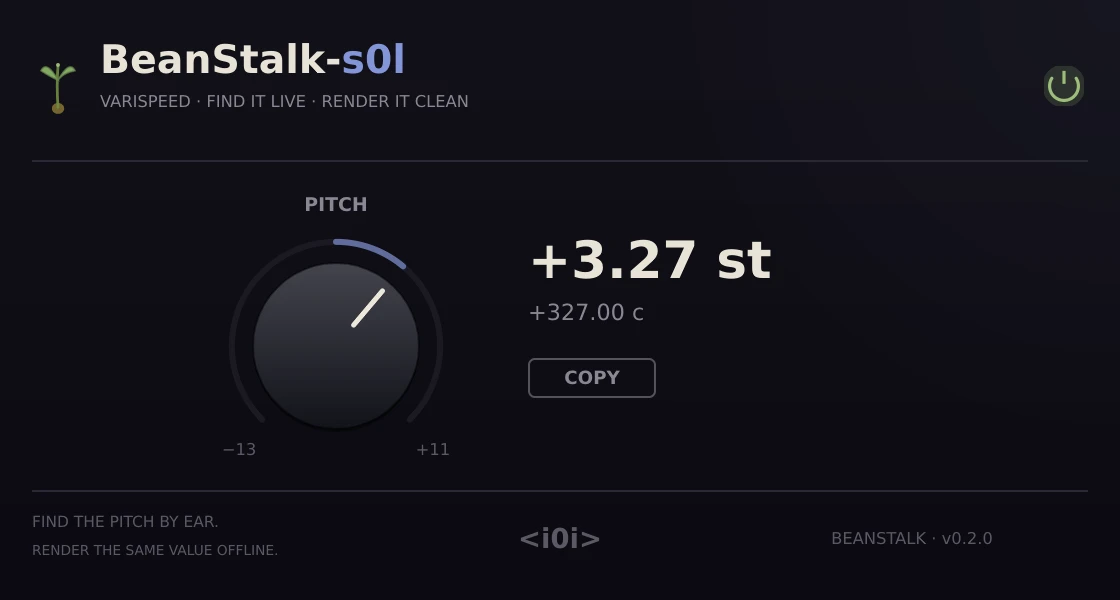
The BeanStalk-s0l VST3 panel: a dark window with the title in cream and periwinkle, the subtitle 'VARISPEED · FIND IT LIVE · RENDER IT CLEAN', a bean-sprout mark and a green power light. A single PITCH knob with a short periwinkle arc from 12 o'clock, minus 13 and plus 11 at its ends, beside a large readout '+3.27 st', '+327.00 c' and a COPY button.
The VST3 (a render of the plugin's own editor; +3.27 st).
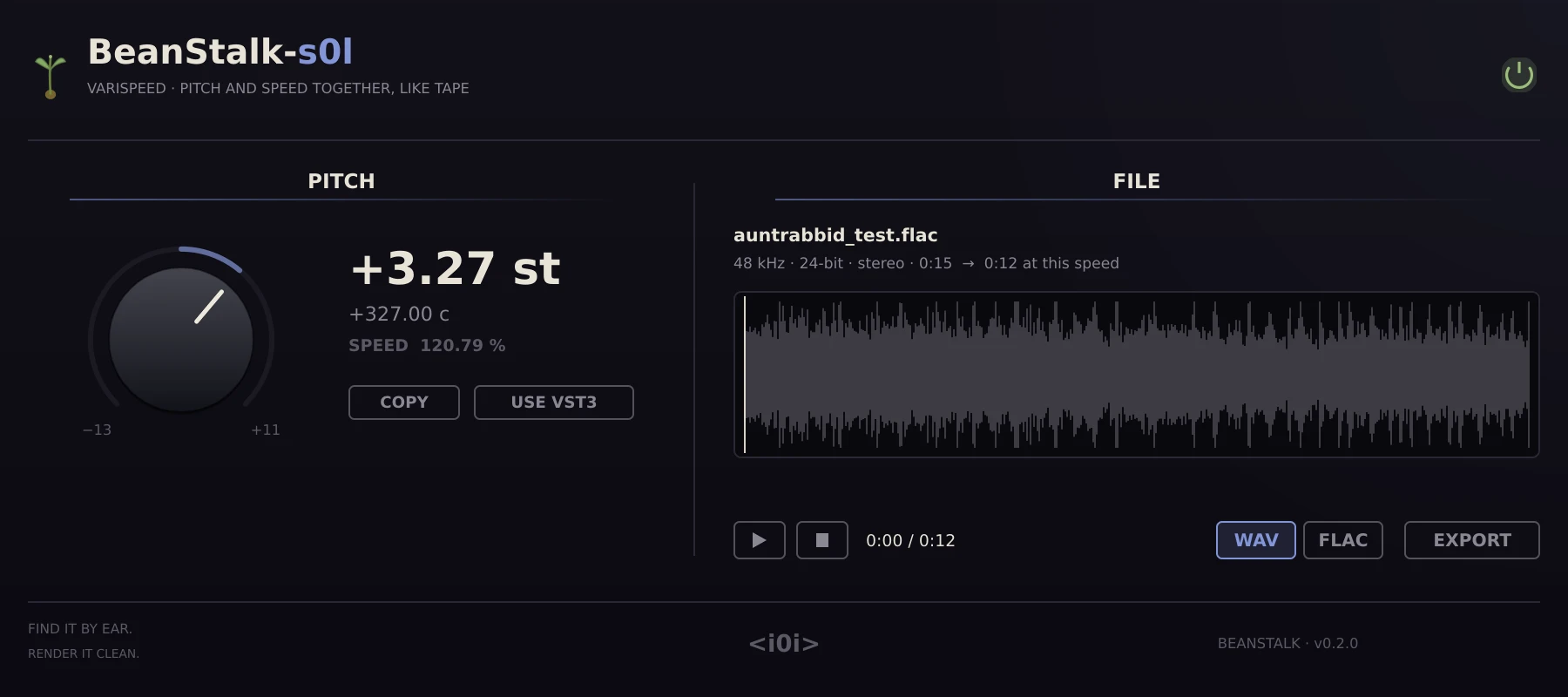
The s0l standalone window: a PITCH section with the knob, '+3.27 st', '+327.00 c', 'SPEED 120.79 %', COPY and USE VST3 buttons, and a FILE section with the file name auntrabbid_test.flac, '48 kHz · 24-bit · stereo · 0:15 → 0:12 at this speed', a waveform overview, play and stop buttons, a time readout, WAV and FLAC toggles and an EXPORT button.
The standalone with a FLAC loaded (a render of the app's own window).
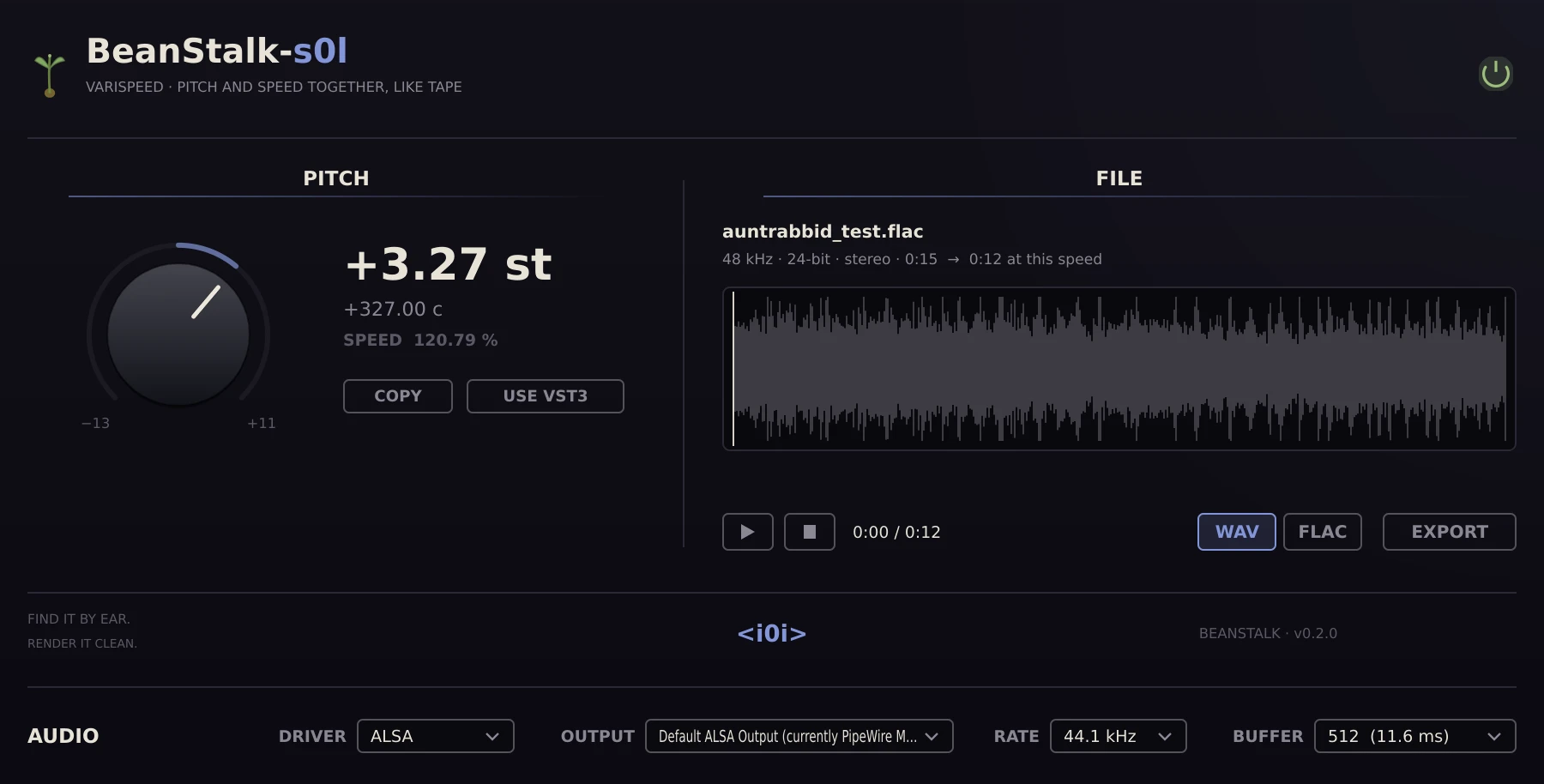
The same standalone window, taller, with an AUDIO row under the footer: DRIVER, OUTPUT, RATE and BUFFER drop-down menus, and the i0i mark lit in periwinkle.
The AUDIO drawer — driver, output, rate and buffer. Same window, just taller.
How to use it

Where it earns its place.

A whole mix, a touch brighterAudition +10 to +30 cents on the master bus in your DAW, then render the bounce in the standalone. Tape-style: it gets a little shorter too.
Retune a sample to the songDial the sample in against the track with the VST3, COPY the value, and export the sample at exactly that pitch.
Slow it down, darker and longerSeveral semitones down in the standalone for the classic half-speed weight, length and all.
Fix a recording made off-speedFind the cents by ear against a reference, then render the correction at a hundredth-of-a-cent resolution.
A few things to know before you download
What it isn't

Read this before you download.

The VST3 is for auditioningTo stay in time with your host the live engine jumps its read point now and then, with a waveform-matched crossfade. At large settings you can hear it: pitching down skips a little of the input, pitching up repeats a little. Render the real thing in the standalone.
Not a time-stretchs0l never changes length without changing pitch, or pitch without length (outside the VST3 audition). That's what varispeed is.
20 ms of latencyThe VST3 reports a fixed 20 ms; hosts with delay compensation line it up.
Not a pitch correctorOne static value per file — no automation of the render, no formants, no tuning detection.
Early releasev0.2.0. The DSP is measured and tested, but it has not been run in every host or on every audio driver.
Technical details and verified specs
Technical

Verified specifications.

FormatsVST3 · Standalone application
Operating systemsWindows (64-bit) · Linux (64-bit)
Range−13.00 … +11.00 semitones · steps of 0.01 cent
VST3 latency20 ms, reported to the host · 0 st = exact dry, delayed
Live engine64-tap windowed sinc · waveform-aligned splices · ≈ −83 … −102 dB THD+N on test tones
Render engine512-tap Kaiser windowed sinc · whole file · ≈ −150 dB THD+N on test tones
FilesOpen WAV or FLAC · export WAV 32-bit float or FLAC 24-bit, at the file's own rate
ChannelsVST3: mono or stereo · standalone: any file to a stereo output pair
CPU (VST3)≈ 2–5 % of one core at 48 kHz (measured on the test machine)
Audio driversLinux: ALSA, JACK · Windows: WASAPI, DirectSound, JACK (when JACK is installed)
BuildsTwo tiers per platform: a legacy VST3 for any 64-bit CPU, and a VST3 + Standalone build for CPUs with AVX2
Version0.2.0

Find it live. Render it clean.

s0l is pay-what-you-want. A varispeed that does one thing and adds nothing — VST3 for the audition, a standalone for the render. Windows and Linux. More platforms may follow.

Get s0l on Gumroad

More BeanStalk plugins

See all plugins →