BeanStalk Plugin

Sat0rate

Five different saturation flavors on one MORPH control. Find the grit you like, then use the WHEEL to steer which part of it comes through.

Morph · Wheel · Stereo FX

Five flavors. One way in.

Turn MORPH to move between five saturation engines. The WHEEL then reshapes the result by character. You can start clean and push only as far as the track needs.

Get Sat0rate on Gumroad Pay what you want · free · VST3 + Standalone · Windows + Linux
Sat0rate
Built byBean.S.talk · BeanStalk Audio
Statusv0.1.0 · Windows + Linux — more platforms may follow
What is it?

So, what does it do?

Five saturation flavors live behind one MORPH control. Find the kind of grit you like, then use WHEEL to steer the result.

A closer look at the controls
The interface

One panel, three groups.

SATURATE holds MORPH, WHEEL, GAIN COMP and FINE; STEREO FX holds ROUND, FOCUS and DUCK; OUTPUT holds WET and a polarity toggle. The wheel's readout names the blend it is on. Click the bean-sprout for the numeric readouts; the window grows by exactly those rows and shrinks back when they are hidden.
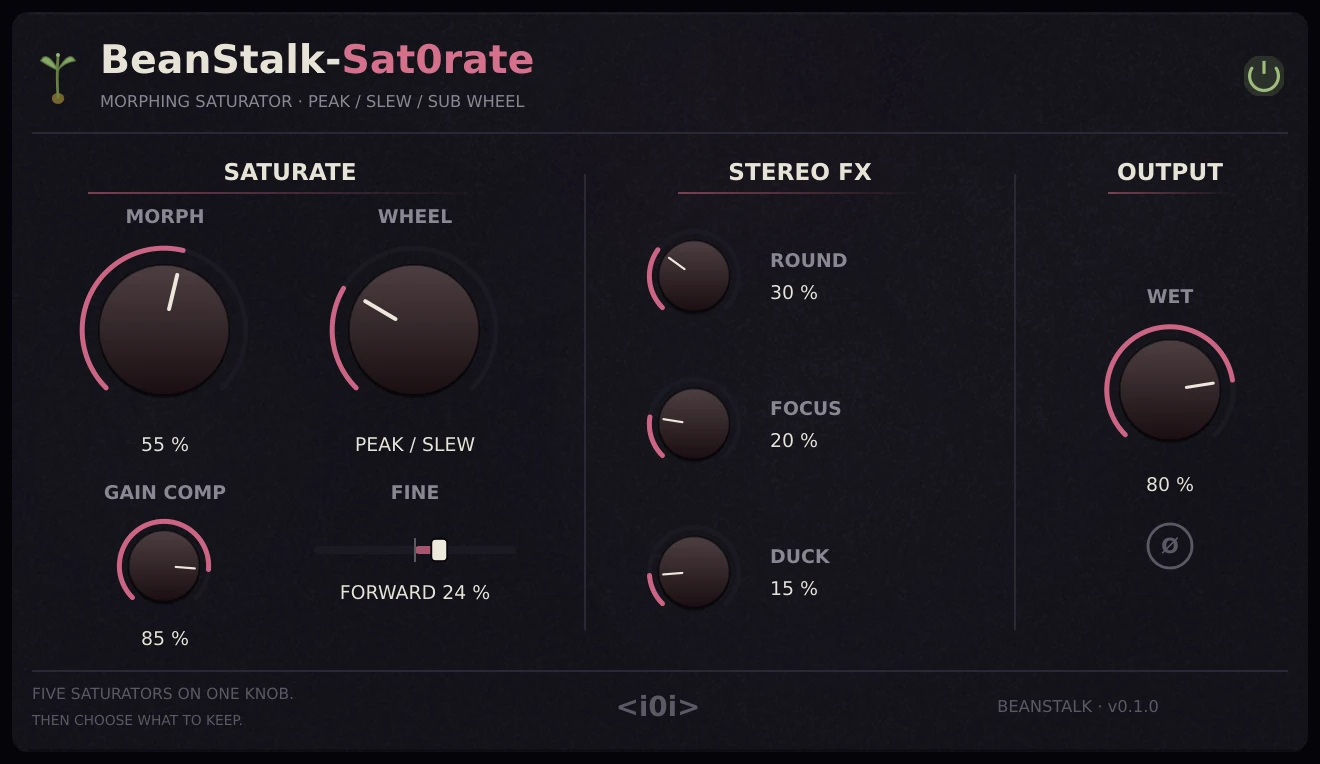
The BeanStalk-Sat0rate front panel: a dark bar with the title in cream and raspberry pink, a bean-sprout mark at the left and a green power light at the right. Three groups: SATURATE with large MORPH and WHEEL knobs, a GAIN COMP knob under MORPH and a centre-detent FINE bar under WHEEL; STEREO FX with ROUND, FOCUS and DUCK as small knobs with readouts beside them; and OUTPUT with a WET knob and a polarity symbol. The footer carries the i0i mark at the centre.
The front panel with the readouts shown (a render of the plugin's own editor; demo settings).
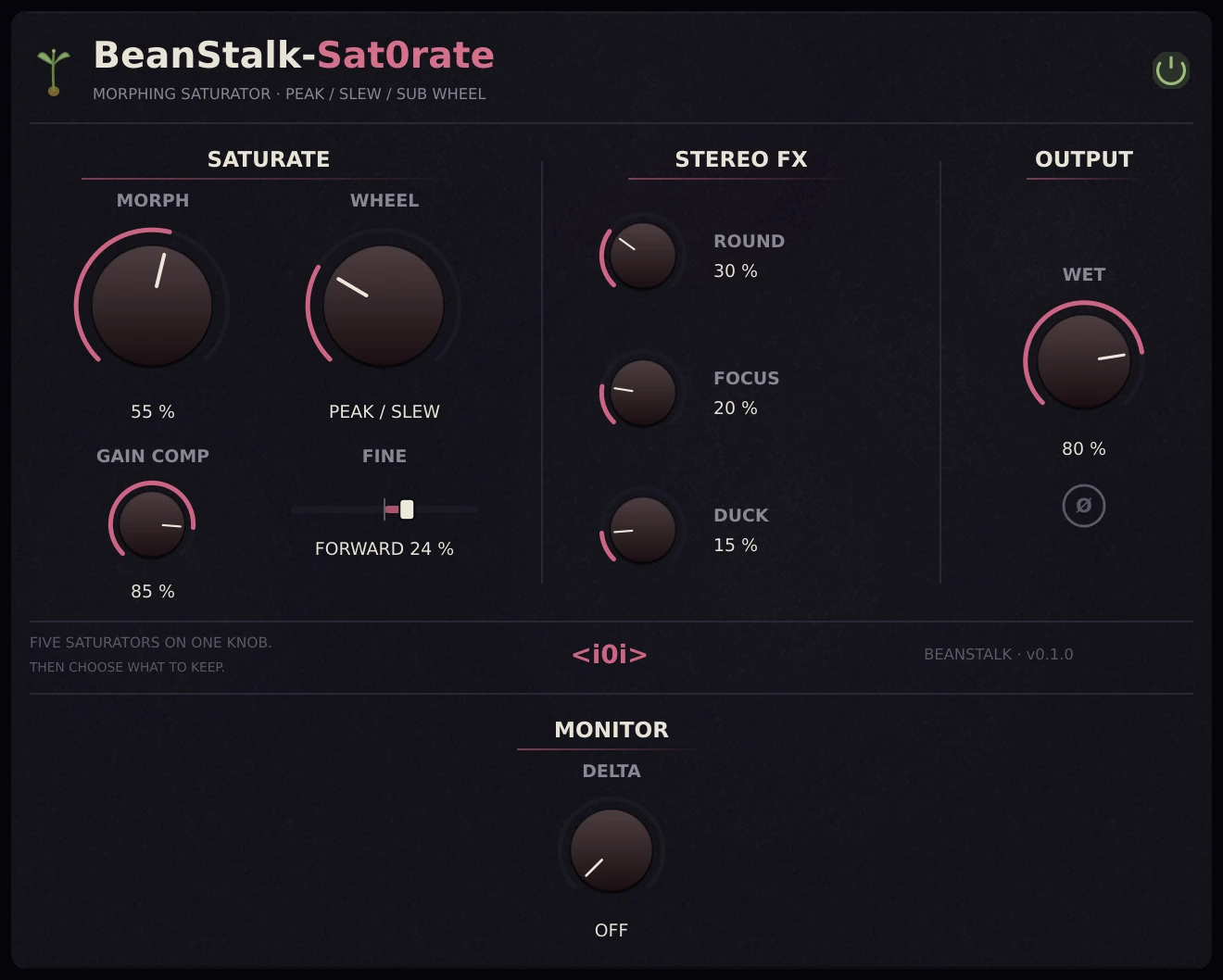
The same panel with the drawer open below the footer: a MONITOR section with a single DELTA knob.
The drawer — the DELTA monitor. Same window, just taller.
Signal flow

One chain, then a wheel, then the finish.

Dry runs alongside the whole way, so WET, GAIN COMP and the DELTA monitor always compare against it.

INSTEREOMORPH CHAIN5 SATURATORS · BYPASS AT 0WHEEL + FINEPEAK / SLEW / SUB BLENDSTEREO FXROUND · FOCUS · DUCKCEILINGSAFETY NETGAIN COMPMATCH TO DRYINVERTØWETVS DRYDELTAMONITOROUTSTEREOTHE DRY TAP IS HELD THE WHOLE WAY: WET MIXES AGAINST IT, DELTA PLAYS PROCESSED MINUS DRY
Morph chainSpiral2, Tube2, Mojo, Dyno, Righteous4 with equal-power crossfades; each stage is solo for most of its slice of the knob. Zero is a bit-identical bypass.
Wheel + FineThe saturated signal is split into Peak, Slew and Sub streams. The wheel sweeps six equal-power blends between them; FINE is a small centre-detent offset.
Stereo FXRound widens the sides, Focus mono-izes the low end, Duck saturates the centre. Each is limited to the 0 – 10 % of the source's range where it stays musical.
Gain comp, invert, wetGain comp pulls the wet loudness toward the dry (up to ±12 dB). Invert flips the wet polarity before the Wet mix. Delta plays processed minus dry.
Controls

Eight knobs, a bar, a toggle.

MORPH0 – 100 % · 0 = true bypassWalks through the five saturators. The readout says OFF at zero.
WHEEL0 – 100 % · one lapSweeps Peak, Peak / Slew, Slew, Slew / Sub, Sub, Sub / Peak. The readout names the blend.
FINEcentre-detent barA vernier on top of the wheel: BACK or FORWARD within the current blend.
GAIN COMP0 – 100 % · default 85 %How much of the loudness-match correction is applied (feedforward RMS match to the dry; the correction is limited to ×0.25 – ×4).
ROUND0 – 100 % of 0 – 0.1Airwindows StereoFX 'Wide': widens the side channel.
FOCUS0 – 100 % of 0 – 0.1StereoFX 'MonoBs': mono-izes the low end.
DUCK0 – 100 % of 0 – 0.1StereoFX 'CSquish': saturates the centre channel.
WET0 – 100 % · default 100 %The processed signal against the held dry.
ØtoggleFlips the wet polarity before the Wet mix.
DELTAdrawer · 0 – 100 %Fades the output toward processed minus dry, level-matched so it is audible. Off at zero.
The bean-sprout marktop-leftShows the numeric readouts. The window gives the rows back when they are hidden.
The markfooter, dead centreOpens the drawer with the DELTA monitor.
Power lighttop-rightBypass. Green while on, grey when bypassed.
How to use it

Where it earns its place.

Warm to crunchy on one knobTurn MORPH up through the chain and listen for the handoffs between stages.
Keep only the edgeSet the WHEEL to Slew to hear the saturated signal's movement; Sub for just the weight; Peak for the peaks.
Fine in betweenUse FINE to settle between two neighbouring blends.
Keep the level honestLeave GAIN COMP up so the saturators' swings don't change how loud it sounds.
Hear what changedRaise DELTA to listen to processed minus dry — useful for comb filtering when Invert and Wet are both in play.
Finish the imageA touch of ROUND widens; FOCUS tightens the low end; DUCK thickens the centre.
A few things to know before you download
What it isn't

Read this before you download.

Not subtle at full MORPHThe chain gets loud and dense. The safety ceiling is insurance, not a limiter.
Not level-matched by defaultGAIN COMP is a smoothed feedforward correction (300 ms) at 85 %, not a look-ahead limiter; fast transients still change level.
The wheel isn't a filterIt chooses between three derived streams of the saturated signal; it does not apply EQ.
Early releasev0.1.0 of the new interface. The DSP is the established one, but it has not been run in every host.
Technical details and verified specs
Technical

Verified specifications.

FormatsVST3 · Standalone application
Operating systemsWindows (64-bit) · Linux (64-bit)
ChannelsStereo in, stereo out
Latency0 samples
ChainSpiral2 → Tube2 → Mojo → Dyno → Righteous4, equal-power crossfades; true bypass at MORPH 0
WheelSix sextants of Peak / Slew / Sub, plus FINE
Stereo FXRound, Focus, Duck, each 0 – 0.1 of the source range
AutomationAll controls, Invert and Bypass are host-automatable
BuildsTwo tiers per platform: a legacy VST3 for any 64-bit CPU, and a VST3 + Standalone build for CPUs with AVX2
Version0.1.0

DSP lineage: Spiral2, Tube2, Mojo, Dyno, Righteous4 and StereoFX are ports of Airwindows plugins (Chris Johnson, MIT licensed); the notice is included with the download. The Peak / Slew / Sub wheel uses Monitoring3-equivalent math. This does not imply endorsement by or affiliation with Airwindows.

Five saturators on one knob.

Sat0rate is pay-what-you-want, and free is a fair price. VST3 and Standalone, Windows and Linux. More platforms may follow.

Get Sat0rate on Gumroad

More BeanStalk plugins

See all plugins →