BeanStalk Plugin

c0nfIneS

Seven bands that can make ordinary EQ cuts—or dissolve parts of the sound in a more unusual way. Start familiar, then explore.

Field Absorbed EQ

An EQ cut with another side.

Each band works on one frequency region. At zero Character, it behaves like a straightforward cut. Turn Character to change how that region is reduced.

Get c0nfIneS on Gumroad Pay what you want · free · VST3 + Standalone · Windows + Linux
c0nfIneS
Built byBean.S.talk · BeanStalk Audio
StatusReleased · Windows + Linux — more platforms may follow
What is it?

So, what does it do?

Seven bands give you familiar EQ cuts, with a stranger option hiding behind Character. Start with the normal sound, then see what happens when you turn it up.

Curious how it works?
The Concept

Where it cuts, and when it lets go.

The left side below shows the seven fields as static dips, computed from the plugin's own filter design. The right side shows one band with Amount at −12 dB on two notes. At Character 0 the cut sits at −12 dB the whole time. At higher Character it stays at −12 dB while each note sounds, then relaxes as the note decays, and snaps back when the next one arrives.
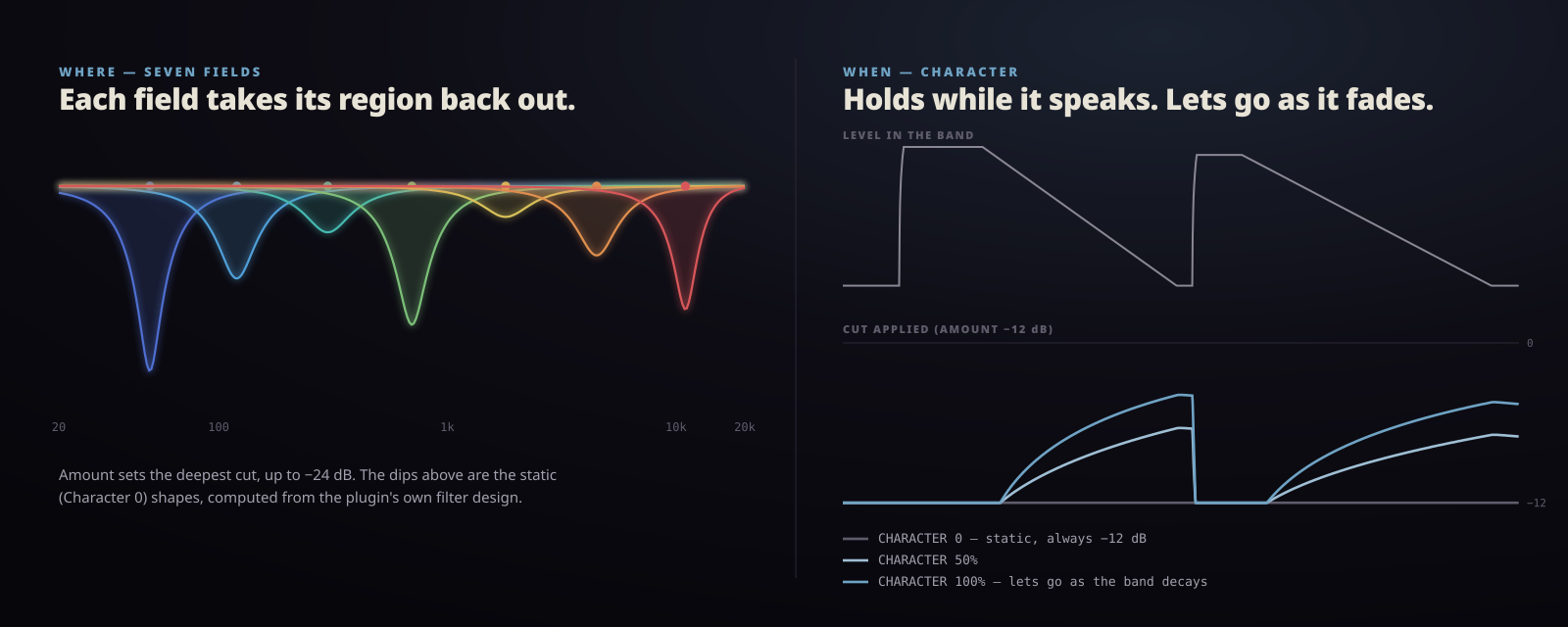
Left: seven coloured dips across a 20 Hz to 20 kHz axis, deep blue at the low end through green to red at the top, each a static cut. Right: the level in one band over two notes, and below it the cut applied with Amount at −12 dB. At Character 0 the cut is a flat line at −12 dB. At Character 50 and 100 percent the cut holds −12 dB while each note sounds, then curves back toward 0 as the note decays, returning to −12 dB when the next note starts.
Curves computed from the plugin's own per-band law on a two-note band envelope. The measured transient result is the same: −23.97 dB during a burst at every Character setting, with the cut relaxing afterwards as Character rises.
Signal Path

Seven bands in series. Each one subtracts itself.

Audio passes through the seven bands one after another, then through the Solo selector. Inside every band, a bandpass isolates the region. Two envelope followers compare its current level with its recent level. Character shapes that comparison, Amount scales it, and that much of the band's own content is subtracted. The dry signal always passes. Only the band's own content is ever taken away.

IN BAND 1SUB BAND 2LOW BAND 3LOW-MID BAND 4MID BAND 5UPPER-MID BAND 6PRESENCE BAND 7AIR SOLO SELECTnormal · band · global OUT INSIDE EVERY BAND (PER CHANNEL) xband input BANDPASSFrequency · Q FAST ENVELOPE eτ = max(10 ms, 2/f) SLOW REFERENCE Lτ = 500 ms ACTIVITY mclamp(e ÷ L, 0, 1) CHARACTERm ^ (0.25 · Character) × (1 − g)g from Amount SUBTRACTy = x − a · xk dry x — always passes; only a · xk is taken away xk — the band's own content, the only thing ever subtracted Amount 0 dB or OFF ⇒ the band is PARKED: not computed at all, signal passes bit-exact (10 ms fade in/out)
BandpassIsolates the band around Frequency. Q sets the width, from narrow to a three-octave sweep.
Fast envelope / slow referenceHow loud the band is now (10 ms, a little longer for the lowest bands) against how loud it has been (500 ms). Their ratio, clamped to 0–1, is the band's activity.
CharacterRaises activity to the power 0.25 × Character. At 0 the result is always 1, so the band is a static cut. Higher values let the cut shrink when activity drops.
AmountThe deepest cut, 0 to −24 dB. At the band centre with Character 0, the measured dip equals Amount exactly.
Parked bandsAmount at 0 dB, or the band switched OFF, takes it completely out of the path, bit-exact and using no CPU. Switching in or out uses a 10 ms fade.
SoloBand Solo plays what that band removes. Global Solo plays everything all seven remove. Neither changes the chain itself.
Controls

Seven bands. One on the bench at a time.

Band cards 1–7top rowClick a card, or step with ‹ ›, to edit that band. A filled dot means the band is working. A hollow dot means it's parked.
Frequency20 Hz – 20 kHz, per bandWhere the field sits. Every band covers the full range, and the names are just starting positions (50 Hz … 11 kHz).
Q0.33 – 4.00, per bandHow narrow the field is. Higher Q means narrower. The display is 1 ÷ width in octaves (0.25–3 octaves).
Amount0 to −24 dB, per band, default 0How deeply the field dissolves its region. At 0 dB the band is parked. The arc grows as the cut deepens.
Character0–100 %, per band, default 50 %0 % gives a static cut. Turning it up lets the cut ease off whenever the band falls below its own recent level.
ONper bandSwitches the band in or out without losing its settings. OFF parks it.
Soloper bandHear exactly what this band is taking out. Solo several bands to hear their removals summed.
Global SoloAdvanced drawerHear everything the whole plugin removes (dry minus wet). Overrides band Solo.
CHARper bandHear only what Character changes: the difference between this band with Character up and the same band at Character 0. It is silent at Character 0, and it is often very quiet.
Global CHARAdvanced drawerThe same Character difference for all seven bands at once. Global Solo overrides it, and it overrides the per-band buttons.
TrimAdvanced drawer, ±12 dBOutput level, applied after the bands and before the analyzer.
Dots on the response stripdragGrab an active band's dot. Left and right change Frequency, up and down change Amount. Double-click a band card to reset that band.
The bean-sprout marktop-leftClick to show the numeric readouts. It's dormant by default.
The <i0i> markfooter, dead centreOpens the Advanced drawer (live spectrum, Trim, Global Solo and Global CHAR) by growing the same window.
Bypassheader power lightThe host's bypass. Returns the untouched signal.
A closer look at the controls
The Interface

Seven colours, from cold to hot.

The seven bands run from deep blue in the SUB to hot red in the AIR, like a temperature scale for frequency. The panel shows every band's position and static curve at once, but only the selected band's controls, so the interface stays calm and the sound stays the interesting part. It's all drawn as vectors in the shared BeanStalk family style, and it scales from 0.75× to 2×.
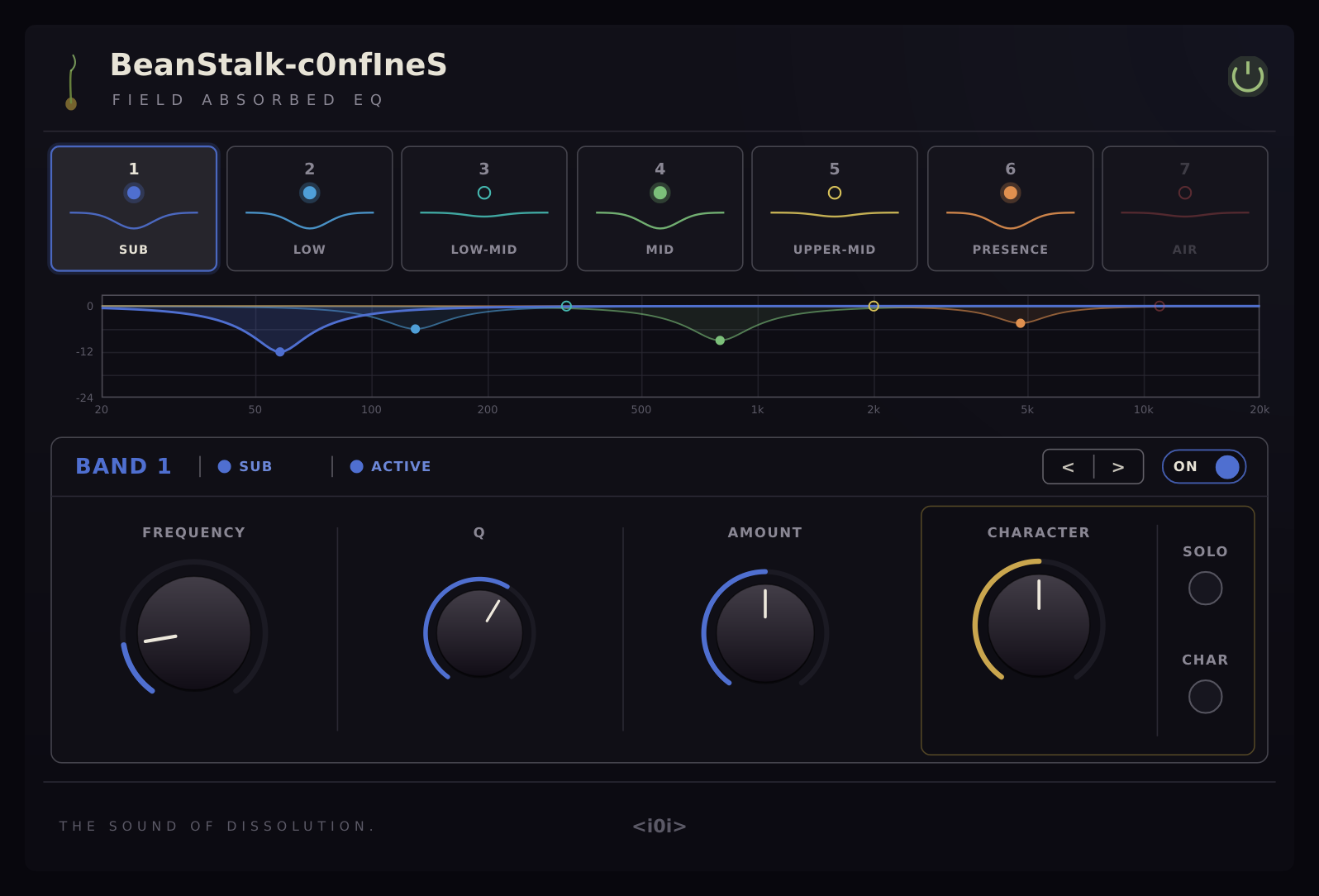
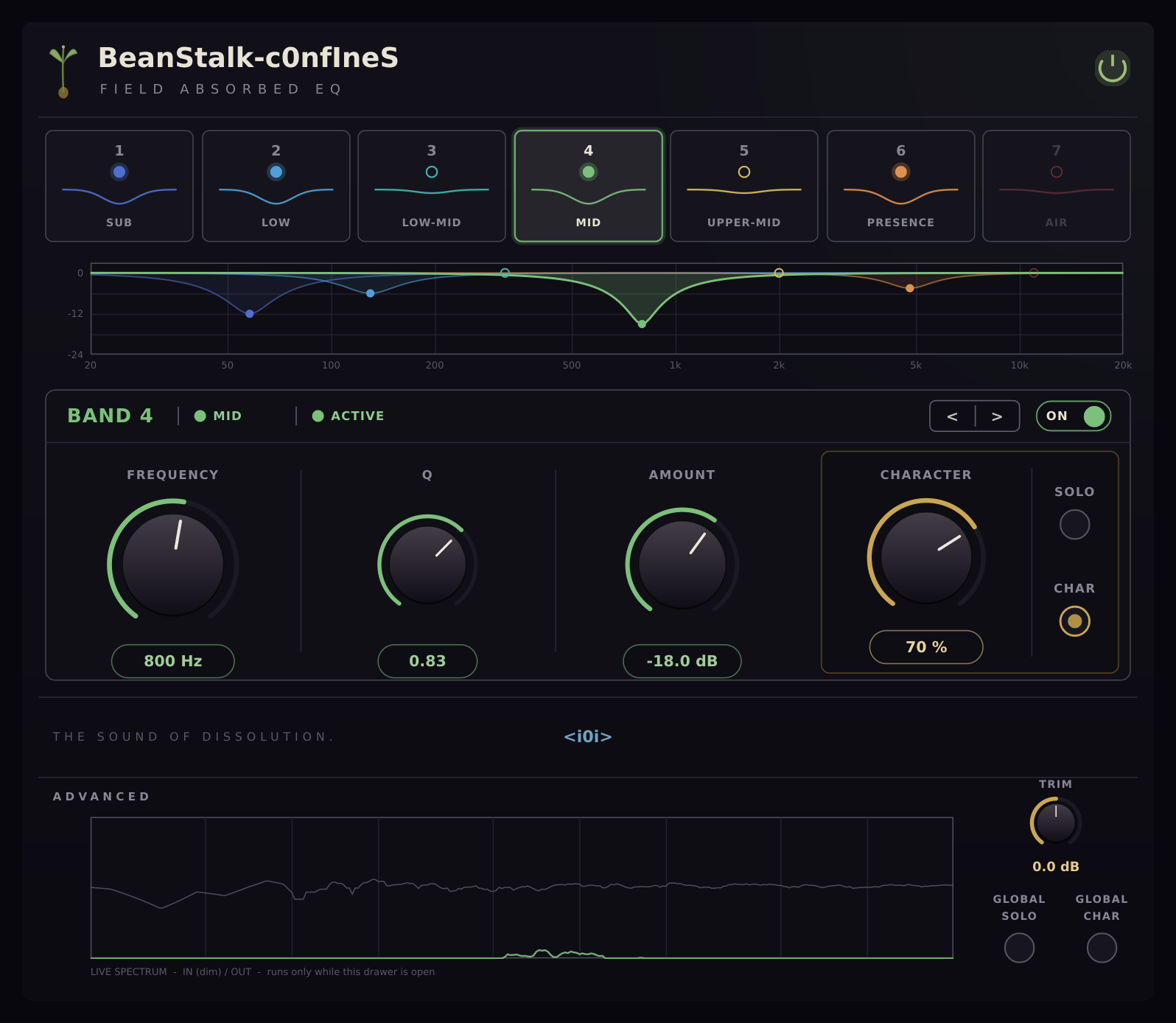
The BeanStalk-c0nfIneS panel. Header: bean mark, 'BeanStalk-c0nfIneS', 'FIELD ABSORBED EQ' and a green power light. Seven band cards numbered 1 to 7 (SUB, LOW, LOW-MID, MID, UPPER-MID, PRESENCE, AIR) coloured blue through teal, green, yellow and orange to red, with SUB selected. Below them a static response strip with coloured dips. Then the Band 1 editor: Frequency, Q and Amount knobs in blue, and a gold Character knob beside round Solo and CHAR buttons. Footer: 'THE SOUND OF DISSOLUTION.' and a centred '<i0i>' mark.
Band 1 (SUB) on the bench. Readouts are hidden until the bean is clicked.
The same panel with Band 4 (MID, green) selected and readouts shown: 800 Hz, Q 0.83, −18.0 dB, Character 70 %. The window has grown taller to show the Advanced drawer: a live spectrum with a dim input trace and a green output trace showing a dip around 800 Hz, and Trim, Global Solo and Global CHAR at the bottom right.
The <i0i> drawer: live input/output spectrum, output Trim, Global Solo and Global CHAR. The analyzer only runs while the drawer is open.
How to use it

Where it earns its place.

A plain corrective cutCharacter at 0 %. Every band becomes a clean static dip at exactly the depth you set, so you can use c0nfIneS as a simple seven-band cut EQ.
Harsh presence that only bites on the wordA PRESENCE or UPPER-MID band with high Character cuts fully on each syllable and eases off in the decays between them, so the voice keeps its air.
Boxy low-mids that build upPut a LOW-MID band on the build-up. It pulls back while the region swells and lets the fade-out through.
Several small moves at onceEach band has its own Character, so some bands can stay static while others follow the music.
Find the problem by earSolo a band and sweep Frequency. You hear exactly what it's removing, and with Global Solo you hear everything the plugin takes out.
Instant A/BSwitch a band OFF, or bring its Amount to 0 dB, for a bit-exact reference. The power light bypasses the whole plugin.
A few things to know before you download
What it isn't

Read this before you download.

No boostAmount runs from 0 to −24 dB only. c0nfIneS removes energy, it never adds it.
Not a compressor or a threshold-based dynamic EQThere's no threshold and no ratio. Character compares each band with its own recent level, so the input level doesn't change what it does.
It relaxes, it doesn't clamp harderCharacter can only make a cut shallower than Amount, never deeper. At high Character, tails and decays pass more freely.
Technical details and verified specs
Technical

Verified specifications.

FormatsVST3 · Standalone application
Operating systemsWindows 10/11 (64-bit) · Linux (64-bit)
Bands7, in series, each 20 Hz – 20 kHz
Amount0 to −24 dB per band (cut only)
Q0.33 – 4.00 (0.25 – 3 octaves)
Character0–100 % per band. 0 % = exact static cut
Latency0 samples. No lookahead, no oversampling
ChannelsStereo or mono, with independent detectors per channel
Sample ratesTested at 44.1, 48, 88.2, 96, 176.4 and 192 kHz
CPUMeasured on our development machine: about 0.3–0.4 % of one core per active band at 48 kHz. Parked bands cost almost nothing
AutomationEvery band's Frequency, Width/Q, Amount, Character, ON, Solo and CHAR, plus Output Trim, Global Solo, Global CHAR and Bypass

The sound of dissolution.

c0nfIneS is pay what you want, and free is a fair price. VST3 and Standalone for Windows and Linux. More platforms may follow.

Get c0nfIneS on Gumroad

More BeanStalk plugins

See all plugins →