BeanStalk Plugin

0utS

Hear three different sides of the same sound: its edges, its bite, and its weight. Blend them together or listen to each one.

Lenses · Placement · miRr0rS · Air

Three ways to hear one signal.

0utS runs three listening perspectives side by side. It starts neutral, so you can bring each one in gradually and hear what it reveals.

Get 0utS on Gumroad Pay what you want · free · VST3 + Standalone · Windows + Linux
0utS
Built byBean.S.talk · BeanStalk Audio
Statusv0.4.0 · Windows + Linux — more platforms may follow
What is it?

So, what does it do?

Listen to your sound through three different lenses: EDGE, MASS, and AIR. Blend each one in, or solo it to hear what it brings to the party.

Curious how it works?
The concept

Same input. Three different parts of it.

Below: pink noise through each lens, untrimmed, as the plugin runs them. EDGE is a first difference, so it rises with frequency. MASS keeps only the bottom and sits above the input there. BITE folds the peaks through a nonlinear stage and stays close to the input's shape.
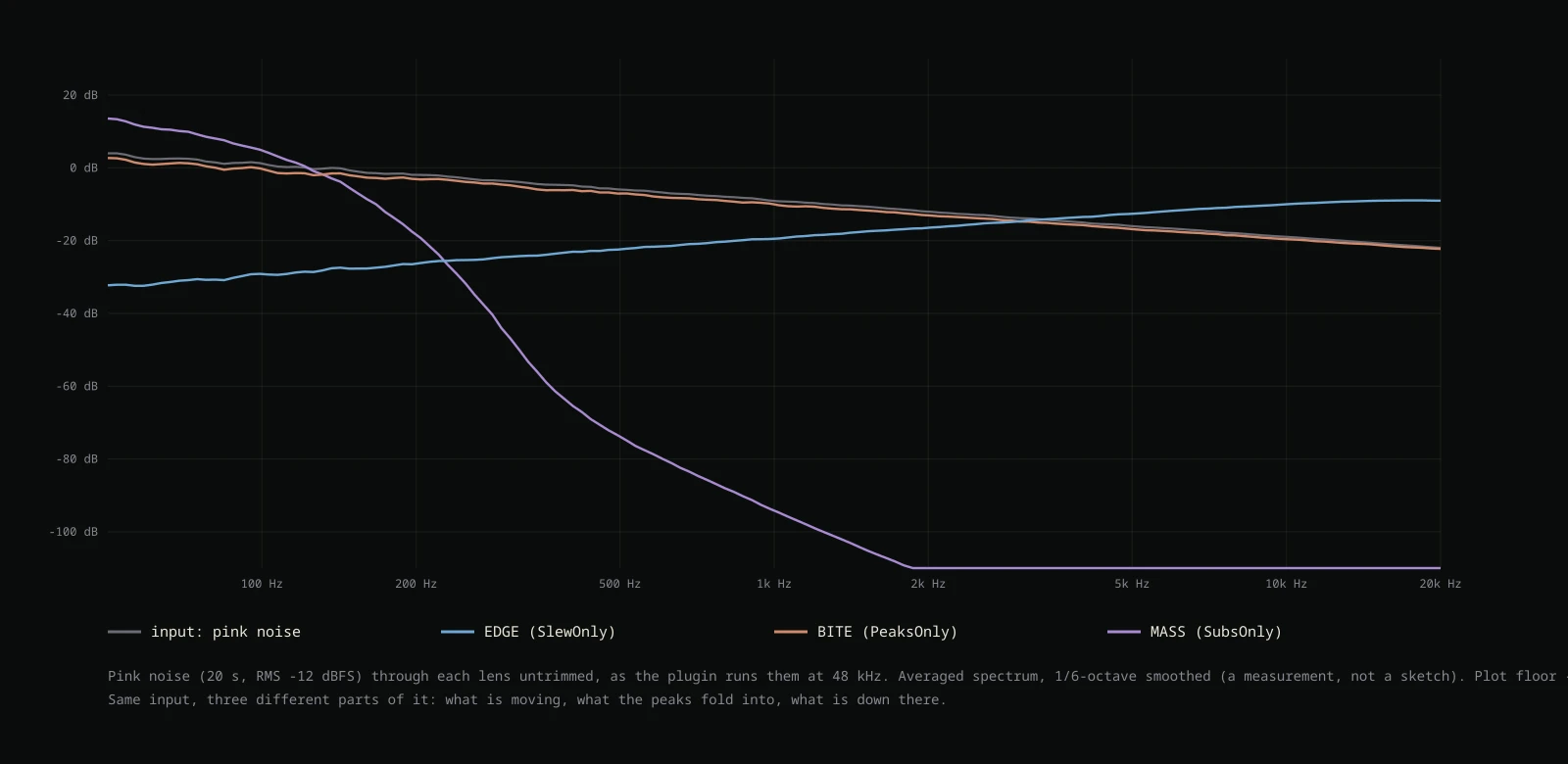
A spectrum chart from 50 Hz to 20 kHz on a dark background with four curves. A grey line shows pink noise falling gently across the band. A blue EDGE line starts about 35 dB below the input at the bass and rises steadily to above the input at the top. An orange BITE line follows the grey input line closely. A violet MASS line starts above the input in the bass and falls steeply, reaching minus 110 dB by about 2 kHz.
A measurement, not a sketch: 20 seconds of pink noise (RMS −12 dBFS) through each lens at 48 kHz, untrimmed. Averaged spectrum, 1/6-octave smoothed; plot floor −110 dB.

The lenses are character streams, not equal-level slices of the signal — which is why each one has its own BLEND.

Signal flow

Dry stays. Lenses sit on top.

Every lens reads the same dry input. Each is placed, scaled by its BLEND and added onto the dry; the sum goes through miRr0rS and AIR, and the output BLEND decides how much of the chain you hear against the dry.

DRY · ONE SHARED REFERENCE (AND, DELAYED TO MATCH miRr0rS, THE DRY FOR THE GLOBAL BLEND) INSTEREOEDGESLEWONLY · WHAT IS MOVINGPLACEMENTGAZE/PERI · H|T× BLEND0 – 100 %BITEPEAKSONLY · PEAK DETAILPLACEMENTGAZE/PERI · H|T× BLEND0 – 100 %MASSSUBSONLY · WHAT IS DOWN THEREPLACEMENTGAZE/PERI · H|T× BLEND0 – 100 %COMBINEDRY + SUM OF LENSESmiRr0rSDISSOLVE · REFLECTAIRLINEAR HIGH SHELFGLOBAL BLENDCHAIN VS DRY · SOLOOUTSTEREO
Parallel lensesEDGE (SlewOnly), BITE (PeaksOnly) and MASS (SubsOnly) each carry their own filter state, so each can be placed and blended separately without colouring another.
The combine ruledry + the sum of each lens × its blend. With every blend at zero you hear your signal unchanged; a lens in isolation is deliberately unreachable.
miRr0rS, then AIRThe only serial stages, both after the combine: a bidirectional dissolve around 400 Hz, then a linear high shelf (9 kHz corner, up to +12 dB).
Output Blend + SoloBlend takes the dry away; Solo plays only what the chain is adding. The dry is delayed to match miRr0rS, so the two stay in time.
Controls

Three lenses. One output. A drawer.

EDGESlewOnly · what is movingThe sample-to-sample difference of the signal: transients and high-frequency movement.
BITEPeaksOnly · peak detailFour allpass stages, each preceded by an asin fold — the detail in the peaks.
MASSSubsOnly · what is down thereA 26-stage cascade that leaves only the very bottom.
GAZE / PERIPHERALouter ring · −100 … +100 %Per lens. Toward Gaze is the centre of the image, toward Peripheral is the sides. Attenuates away from centre; never boosts.
LEFT / RIGHTinner knob · centre = balancedPer lens. Turns one side down while the other stays at unity; never boosts.
BLENDper lens · 0 – 100 % · default 0How much of that lens is added onto the dry. The only thing that sets a lens's level.
OUTPUT BLEND0 – 100 % · default 100The whole chain against the (latency-matched) dry.
SOLOtogglePlays only the difference between the processed and dry signals, at its real level.
miRr0rS LOW / HIGHdrawer · bipolarThe magnitude is a dissolve amount, the sign decides whether it is also reflected. The readout says DISSOLVE, REFLECT or OFF.
AIRdrawer · 0 – 100 %A linear high shelf, corner 9 kHz, up to +12 dB. At zero it is an exact identity.
The bean-sprout marktop-leftClick to reveal every numeric readout. The window gives the space back when they are hidden. Dormant by default.
The <i0i> markfooter, dead centreClick to open the drawer: miRr0rS, then AIR — in the order the signal meets them.
BYPASSheader power lightGreen while on, dim grey when bypassed. A delayed straight pass-through, matched to the plugin's latency.
A closer look at the controls
The Interface

Sea-glass and dark, one colour per lens. Part of the BeanStalk family.

The panel opens compact, with the values hidden. The whole thing scales as one — every label, knob and toggle grows and shrinks together.
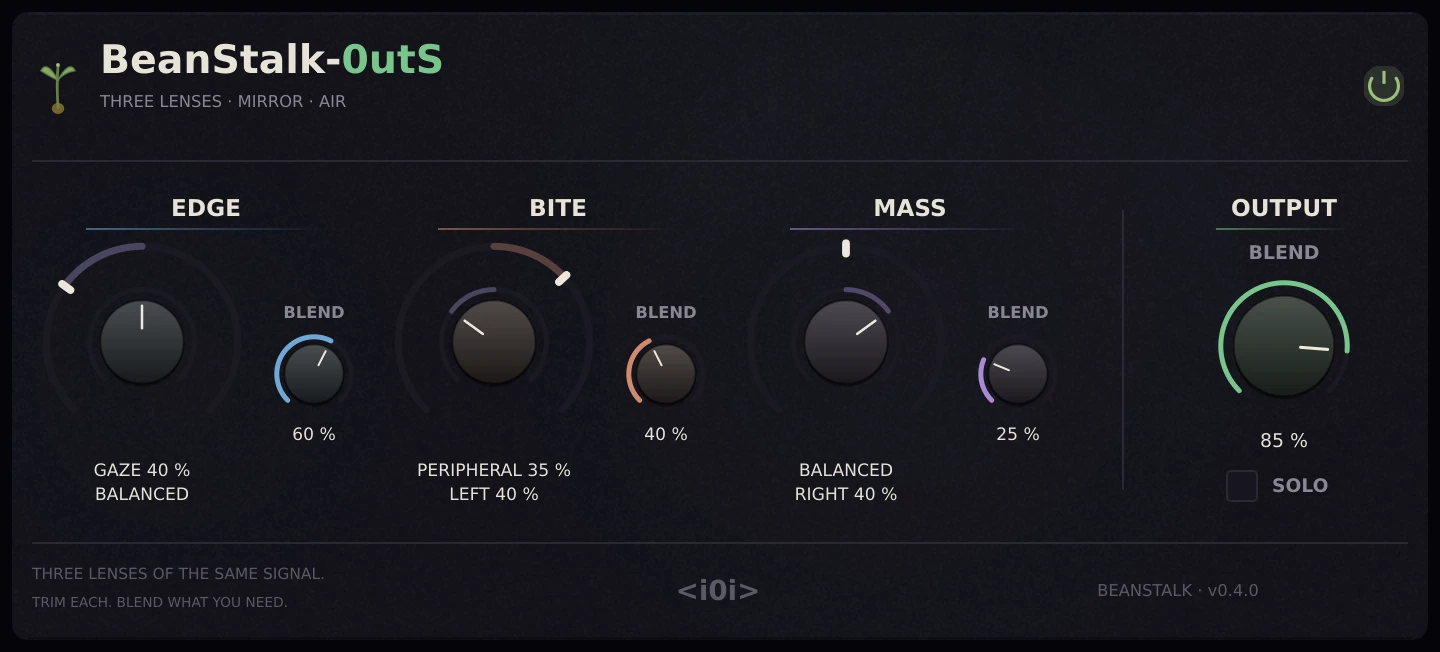
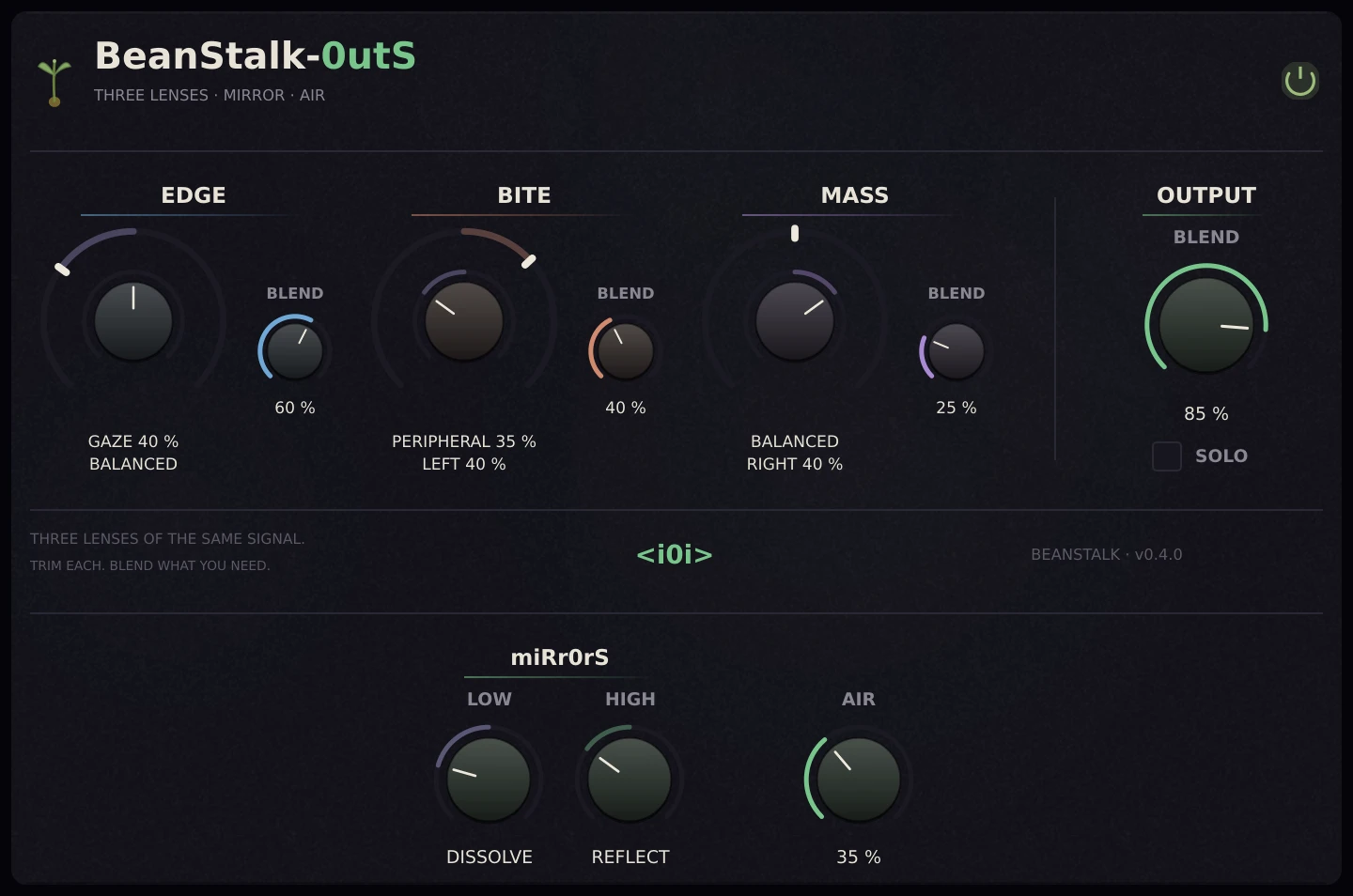
The BeanStalk-0utS front panel: a dark bar with the title in cream and sea-glass green, a bean-sprout mark at top-left and a green power light at top-right. Three lens columns, EDGE in ice blue, BITE in terracotta and MASS in violet, each with a large concentric knob and a small BLEND knob at its bottom right, with readouts such as GAZE 40 % and BALANCED below. After a divider, an OUTPUT column with a larger BLEND knob and a SOLO checkbox. The footer has the i0i mark at the centre.
The front panel with the readouts shown (a render of the plugin's own editor; demo settings).
The same panel with the drawer open below the footer: a miRr0rS section with LOW and HIGH knobs reading DISSOLVE and REFLECT, and an AIR knob.
The drawer — miRr0rS (LOW, HIGH), then AIR. Same window, just taller.
How to use it

Where it earns its place.

Hear what you are addingRaise a lens BLEND, then use SOLO to hear only the difference you are making.
Weight without a boostBring MASS in under a thin source, and place it toward Gaze to keep it in the centre.
Edge and airEDGE adds the movement of the signal; AIR lifts the top above 9 kHz. Two different ways to open a dull mix.
Peripheral on its ownPush a lens toward Peripheral to add only what is at the sides.
Clear the bottomOpen the drawer and dissolve the low field with miRr0rS LOW, or reflect it upward.
Parallel by defaultOUTPUT BLEND takes the dry away when you want the chain on its own; leave it at 100 % to keep dry in.
A few things to know before you download
What it isn't

Read this before you download.

Not level-matchedThe lenses are character streams, not equal slices of the signal. MASS sits well above the input in the bass; EDGE is far quieter than the input there. Use BLEND, and leave headroom — adding lenses onto the dry raises the level.
Not a mastering chainA monitoring and shaping tool. There is no limiter, no ceiling, no loudness metering.
It has latencymiRr0rS's aligned dissolve: 56 samples at 48 kHz (about 1.2 ms), reported to your host. Bypass and the output-blend dry are matched to it.
miRr0rS is a dissolveIt removes content (and optionally reflects it elsewhere). With its knobs centred it does nothing.
Early releasev0.4.0 of the new interface. The DSP has been measured and tested, but it has not been run in every host.
Technical details and verified specs
Technical

Verified specifications.

FormatsVST3 · Standalone application
Operating systemsWindows (64-bit) · Linux (64-bit)
ChannelsStereo in, stereo out
Latency56 samples at 48 kHz (about 1.17 ms), reported to the host
ProcessingDouble precision inside the plugin
DefaultsEvery lens BLEND 0, miRr0rS centred, AIR 0: a delayed, bit-exact pass-through
AIRLinear high shelf, 9 kHz corner, up to +12 dB; bit-exact identity at zero
BypassDelayed straight pass-through
AutomationAll controls, Solo and Bypass are host-automatable
BuildsTwo tiers per platform: a legacy VST3 for any 64-bit CPU, and a VST3 + Standalone build for CPUs with AVX2
Version0.4.0

DSP lineage: the three lenses are ports of Airwindows Monitoring3 (SlewOnly, PeaksOnly, SubsOnly) and the placement is derived from Airwindows EveryTrim (Chris Johnson, MIT licensed); the notice is included with the download. miRr0rS and the AIR shelf are BeanStalk's own. This does not imply endorsement by or affiliation with Airwindows.

One signal. Three lenses.

0utS is pay-what-you-want, and free is a fair price. VST3 and Standalone, Windows and Linux. More platforms may follow.

Get 0utS on Gumroad

More BeanStalk plugins

See all plugins →