BeanStalk Plugin

rEM0litioN

Not quite an EQ. Instead of just boosting or cutting frequencies, rEM0litioN makes parts of the signal interfere with themselves.

Three fields · FREQ · Q · FIELD

Make frequencies meet themselves.

Pick a frequency area, set its width, and turn FIELD to hear what happens when a shifted copy mixes back against the original.

Get rEM0litioN on Gumroad Pay what you want · free · VST3 + Standalone · Windows + Linux
rEM0litioN
Built byBean.S.talk · BeanStalk Audio
Statusv0.3.0 · Windows + Linux — more platforms may follow
What is it?

So, what does it do?

This isn't a regular EQ. rEM0litioN makes a copy of a frequency area interfere with the original, creating dips and peaks you can explore.

Curious how it works?
The concept

One knob, three zones.

FIELD is one knob split into three equal thirds of travel. CONFINE (negative values) lifts the band. DISSOLVE (0 up to +1.00) digs into it, reaching near-total cancellation at exactly +1.00. REFLECT (beyond +1.00) overshoots the null, and the dip gives way to a lift. The arc on the knob changes colour with the zone.
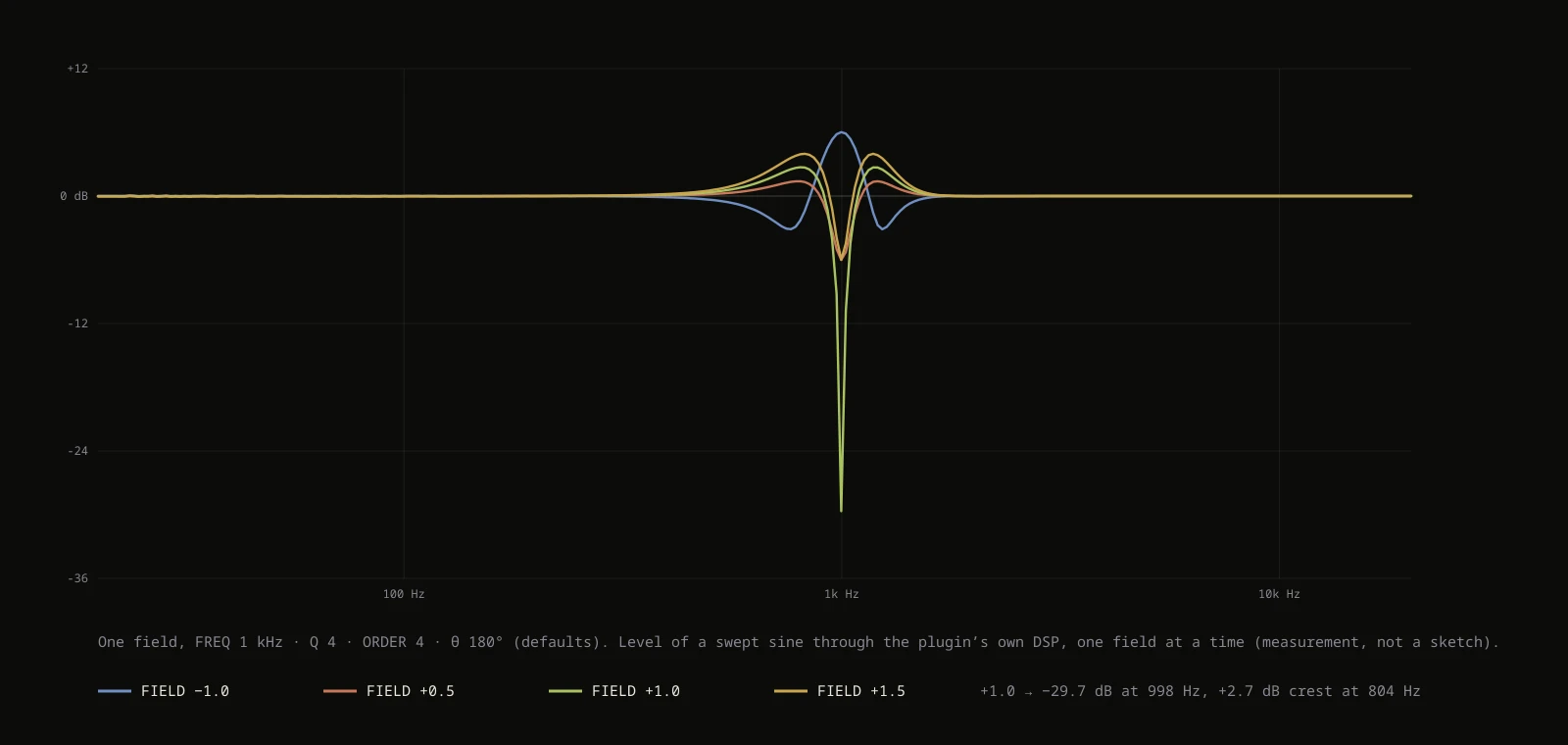
A frequency-response chart from 20 Hz to 20 kHz on a dark background. Four curves for one field at 1 kHz: FIELD −1.0 in blue rises to about +6 dB at 998 Hz with a shallow dip either side; FIELD +0.5 in ember dips about 6 dB; FIELD +1.0 in lime drops almost 30 dB at 998 Hz with a small crest to its left; FIELD +1.5 in gold dips about 6 dB with a larger crest beside it.
A measurement, not a sketch: level of a swept sine through the plugin’s own DSP, one field at FREQ 1 kHz, Q 4, ORDER 4, θ 180° (the defaults). FIELD +1.0 reaches −29.7 dB at 998 Hz at the sweep’s resolution.

The curves are lopsided on purpose: because the added copy is phase-rotated rather than a mirror, a null has a crest beside it, and a lift has a dip. That’s what interference looks like when you build it deliberately.

Signal flow

Three fields, a blend, and a safe output.

Each channel runs the same chain. Fields run in series; θ and ORDER are shared by all three. The dry signal goes straight to BLEND.

Signal flow: stereo in, then FIELD 1, FIELD 2 and FIELD 3 in series (each FREQ, Q, ORDER, theta, FIELD), then BLEND / SOLO (with the dry signal fed around), then a fixed safety stage and TRIM with bypass crossfade, then out.STEREO INL and Reach channel runsthe same chainFIELD 1FREQ 20 Hz–20 kHzQ 0.3–20N identical resonatorstages (ORDER 1–16)rotated by θy = x + FIELD · field(x)FIELD 2FREQ 20 Hz–20 kHzQ 0.3–20N identical resonatorstages (ORDER 1–16)rotated by θy = x + FIELD · field(x)FIELD 3FREQ 20 Hz–20 kHzQ 0.3–20N identical resonatorstages (ORDER 1–16)rotated by θy = x + FIELD · field(x)BLEND / SOLOout = dry + (chain−dry)·BLENDSOLO = (chain−dry)·BLEND(only what was added)SAFETY → TRIMDC block + 21 kHz guardTRIM ±6 dBBYPASS: 20 ms crossfadeOUTdry (untouched input) → BLENDThe three fields run in series, field 1 → 2 → 3, per channel. θ (PHASE & ORDER drawer) is shared by all three fields.
Field = original + copyEach field outputs x + FIELD · field(x), where field(x) is a cascade of identical resonators tuned to FREQ and Q, then phase-rotated by θ.
Solo hears the differenceSOLO plays only what the chain adds or removes, at the BLEND level.
Fixed safety stageA DC blocker and a 21 kHz guard sit after BLEND — not a user control.
Zero latencyEvery stage runs sample by sample — no lookahead, no delay lines.
Controls

Three fields. Three controls each.

FREQ20 Hz – 20 kHz · logWhere the field sits. The knob cap tints along the spectrum, cool for lows to warm for highs.
Q0.3 – 20 · default 4How narrow the field is. Higher Q = a tighter region.
FIELDCONFINE · DISSOLVE · REFLECTHow far into the interference you go. 0 is neutral; +1.00 is the near-total cancellation point; negative values lift.
BLEND0 – 100 % · default 100Mixes the three-field chain against your dry signal.
SOLOdrawerPlays only what the fields add or remove, at the BLEND level.
TRIM±6 dBOutput level after everything else.
θ (theta)0 – 360° · default 180°The interference angle, shared by all three fields. 0° reinforces; 180° opposes.
ORDER1 – 16 · default 4How many identical resonator stages make up each field. More stages = a more selective field.
The bean-sprout marktop-leftClick to reveal every numeric readout. Dormant by default.
The <i0i> markfooter, dead centreClick to open the drawer: θ, ORDER and Solo.
BYPASSheader power lightGreen while on, dim grey when bypassed. A 20 ms crossfade; bit-exact pass-through once settled.
A closer look at the controls
The Interface

Lime and dark. Part of the BeanStalk family.

The panel opens compact, with the values hidden. The whole thing scales as one — every label, knob and toggle grows and shrinks together.
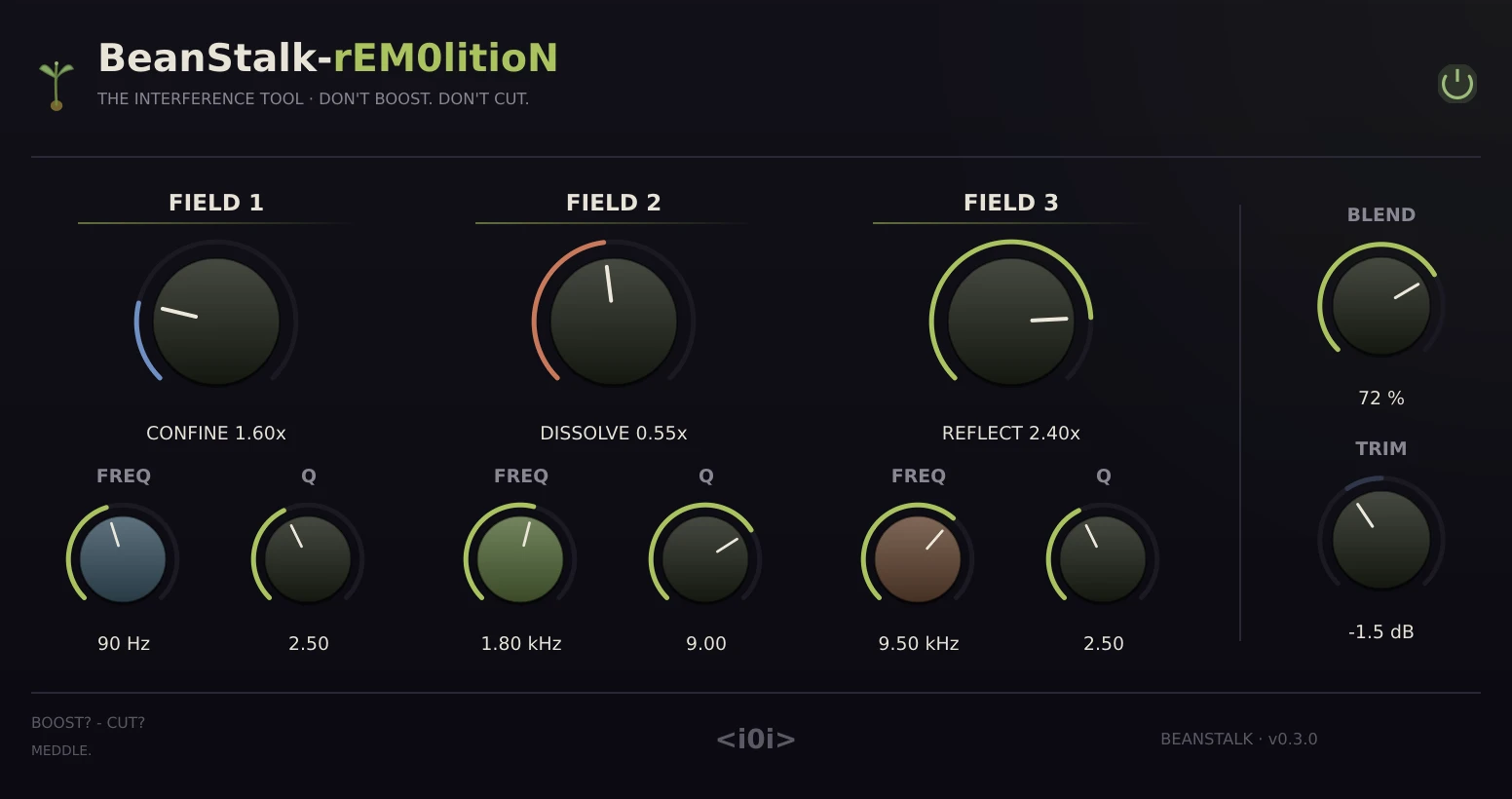
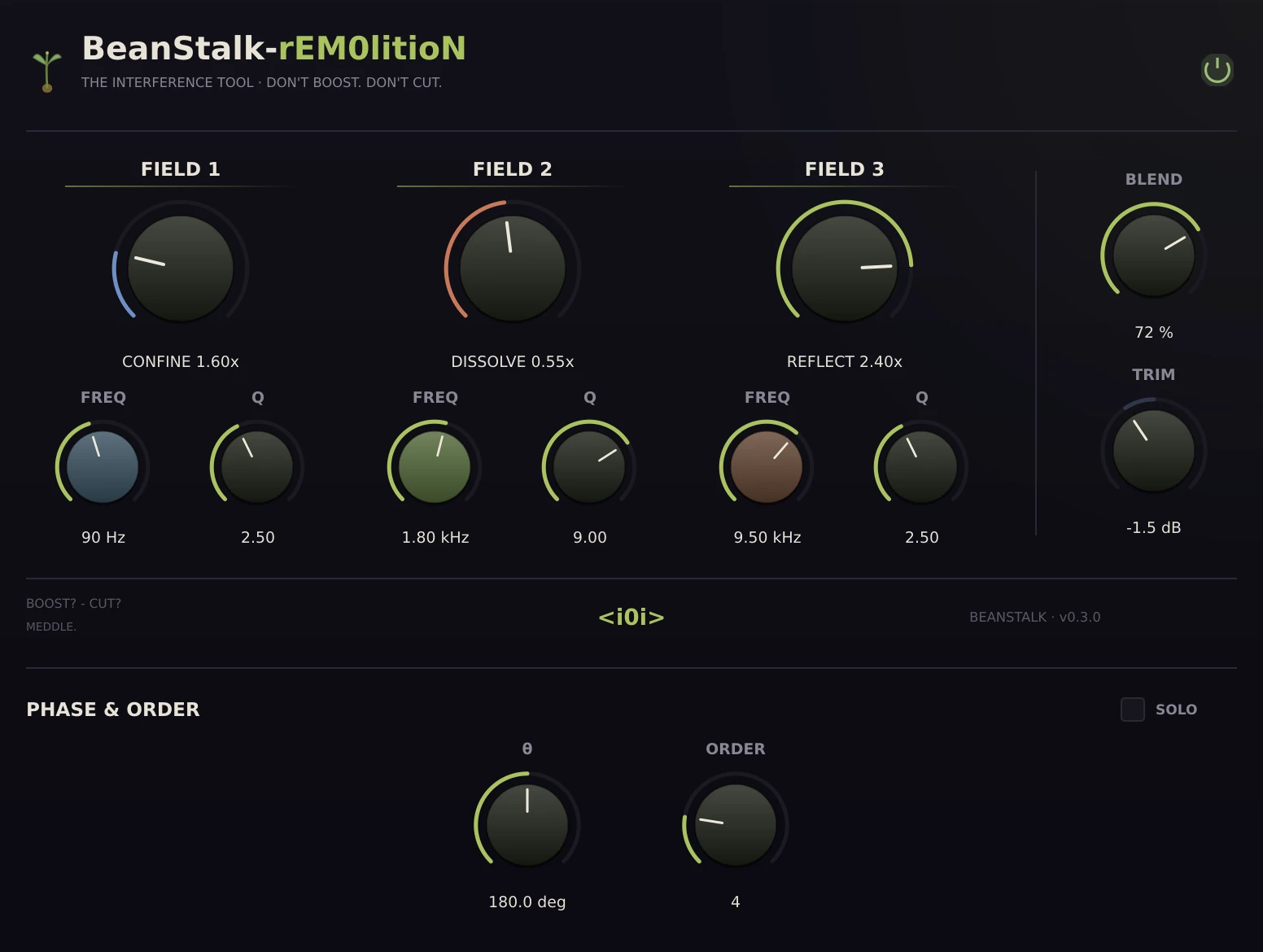
The BeanStalk-rEM0litioN front panel: a dark bar with the title in cream and lime, a bean-sprout mark at top-left and a green power light at top-right. Three columns FIELD 1, FIELD 2, FIELD 3, each with a large FIELD knob above smaller FREQ and Q knobs, and a BLEND and TRIM stack on the right. The footer has the <i0i> mark at the centre.
The front panel with the readouts shown (a render of the plugin’s own editor; demo settings).
The same panel with the drawer open below the footer: a PHASE and ORDER section with a θ knob, an ORDER knob and a SOLO checkbox.
The drawer — θ, ORDER and Solo. Same window, just taller.
How to use it

Where it earns its place.

Dig a null by addingSet FREQ on a resonance or a harsh region, bring FIELD up toward +1.00, and listen: the region disappears into itself rather than being filtered out.
Reinforce without a boostTake FIELD negative to lift a band through the same phase mechanism — a different texture from a bell boost.
Go past the nullPush into REFLECT and the null gives way to a lift. It’s a stranger, lopsided response — worth hearing on its own.
Stack the fieldsRun three at different frequencies, or stack them on one region and use ORDER to narrow or widen their reach.
Turn the angleθ at 180° opposes, 0° reinforces; the angles between are neither. Sweep it in the drawer.
Solo to see what you didSolo plays the difference, so you can hear exactly what the fields are adding or removing.
A few things to know before you download
What it isn't

Read this before you download.

Not a conventional EQIt applies no gain to a band. If you want a bell, a shelf or a high-pass, use an EQ.
Three fields onlyThere is no field-count expansion, no saturation stage and no shelf or filter modes in this version.
Lopsided by designA null has a crest beside it. That asymmetry is the interference, not a bug.
No output limiterFields can lift a band by several dB. Loud material can still overload the bus.
Early releasev0.3.0. The DSP has been measured and tested, but it has not been run in every host.
Technical details and verified specs
Technical

Verified specifications.

FormatsVST3 · Standalone application
Operating systemsWindows (64-bit) · Linux (64-bit)
ChannelsStereo in, stereo out
Latency0 samples
ProcessingDouble precision inside the plugin
Fields3, in series · FREQ 20 Hz–20 kHz · Q 0.3–20 · ORDER 1–16
FIELD−4 … +4; near-total cancellation at +1.00 (≈ −30 dB at 1 kHz, Q 4, ORDER 4, θ 180°)
Bypass20 ms crossfade; bit-exact pass-through once settled
AutomationAll field controls, BLEND, TRIM, θ, ORDER, SOLO and bypass are host-automatable
BuildsTwo tiers per platform: a legacy VST3 for any 64-bit CPU, and a VST3 + Standalone build for CPUs with AVX2
Version0.3.0

Don’t boost. Don’t cut. Interfere.

rEM0litioN is pay-what-you-want, and free is a fair price. Three interference fields, a Solo that plays only what they do, and nothing else in the way — VST3 and Standalone, Windows and Linux. More platforms may follow.

Get rEM0litioN on Gumroad

More BeanStalk plugins

See all plugins →