BeanStalk Plugin

mIcr0S

Tiny timing and pitch differences that make stereo audio feel less perfectly matched. Small moves can change a lot.

Micro-delay · Micro-pitch · Here / Gaze

A little disagreement goes a long way.

mIcr0S shifts the two channels by microseconds and bends pitch by tiny amounts. It's about subtle differences between the sides, not a big chorus wash.

Get mIcr0S on Gumroad Pay what you want · free · VST3 + Standalone · Windows + Linux
mIcr0S
Built byBean.S.talk · BeanStalk Audio
Statusv0.4.0 · Windows + Linux — more platforms may follow
What is it?

So, what does it do?

Tiny timing and pitch changes make the left and right sides disagree just a little. It's a small effect that can make stereo feel more alive.

Curious how it works?
The concept

Each channel, over six seconds.

Below: the delay of each channel from the plugin's own engine. HERE is set to Down and GAZE to Up. Every event is a different rung of the ladder, so the moves grow and shrink in Fibonacci steps, and the two sides of a domain are always a rung apart.
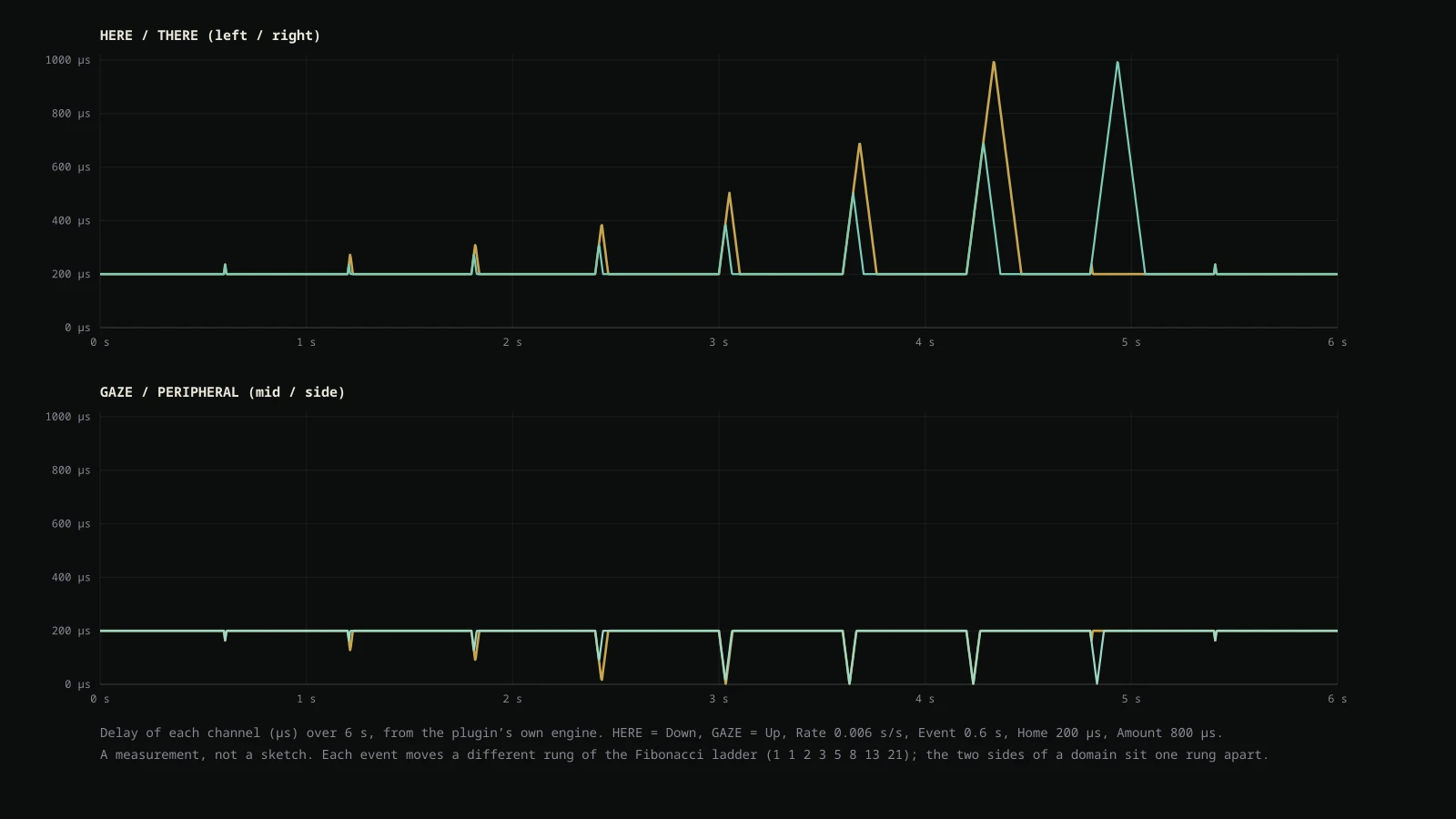
Two charts of delay time in microseconds over six seconds on a dark background. The top chart, HERE / THERE, shows left and right delay idling at 200 microseconds with spikes that grow in Fibonacci steps up to about 1000 microseconds, the two channels one rung apart. The bottom chart, GAZE / PERIPHERAL, shows mid and side dipping downward in matching steps.
Delay of each channel, a measurement from the plugin's own engine (Rate 0.006 s/s, Event 0.6 s, Home 200 µs, Amount 800 µs).

The pitch only changes while a move is in progress: 0.994 or 1.006 of the original rate at these settings, about ∓10.4 cents. At rest it is exactly 1.0.

Signal flow

One clock, one ladder, two domains.

The audio path is short. The interesting part is the control path underneath: a clock, a Fibonacci ladder, an excursion and a rate-limited glide that sets the delay time.

DRY DELAY TIME → BOTH DOMAINS INSTEREO / MONO HERE / THEREL / R · MICRO-DELAY + PITCH GLIDE GAZE / PERIPHERALM / S · SAME ENGINE, ONE RUNG APART RELATIONDRY / WET OUTPUT−24 … +12 dB OUT EVENT CLOCKEVERY 0.1 – 2 s FIBONACCI LADDER1 1 2 3 5 8 13 21 EXCURSIONAMOUNT × RUNG / 21 GLIDERATE s/s · DIRECTION
Event clockOne clock per domain starts a move every EVENT seconds (0.1 – 2 s). A new event that arrives while a move is still running is dropped.
Fibonacci ladderEight rungs, 1 1 2 3 5 8 13 21, stepped one rung per event. The second side of each domain is one rung ahead, so left/right and mid/side never move by the same amount.
Excursion + glideThe rung sets the size of the move as a fraction of AMOUNT; the glide travels at a constant RATE in seconds per second, which is also the maximum pitch tilt. DOWN dips the pitch, UP lifts it.
Two domainsHERE / THERE works on left and right; GAZE / PERIPHERAL encodes to mid/side, runs the same engine and decodes. On a mono source GAZE does nothing — the side channel is empty.
Controls

Direction. Speed. Reach. CHA0S.

HERE · GAZECENTER · DOWN · UPThe direction the pitch tilts during a move, for left/right and mid/side separately. Nine combinations; CENTER means no move. Default is CENTER / CENTER.
SPEED5 stepsHow fast a move travels and how often a new one starts: from a slow drift (≈ ±1.7 cents, every 1.5 s) to a flutter (≈ ±20.7 cents, every 0.1 s). Step 3 is the default.
REACH3 stepsHow far a move can go: none (only the static delay), 400 µs or 800 µs.
CHA0S1× · 2× · 3×Scales the whole gesture — reach and speed together — so pitch and delay both reach further. A multiplier, not a separate algorithm.
RELATION0 – 100 % · default 100Dry/wet. At 0 the plugin is a dry pass-through.
OUTPUT−24 … +12 dBOutput gain.
The bean-sprout marktop-leftClick to show every numeric readout. Dormant (hidden) by default.
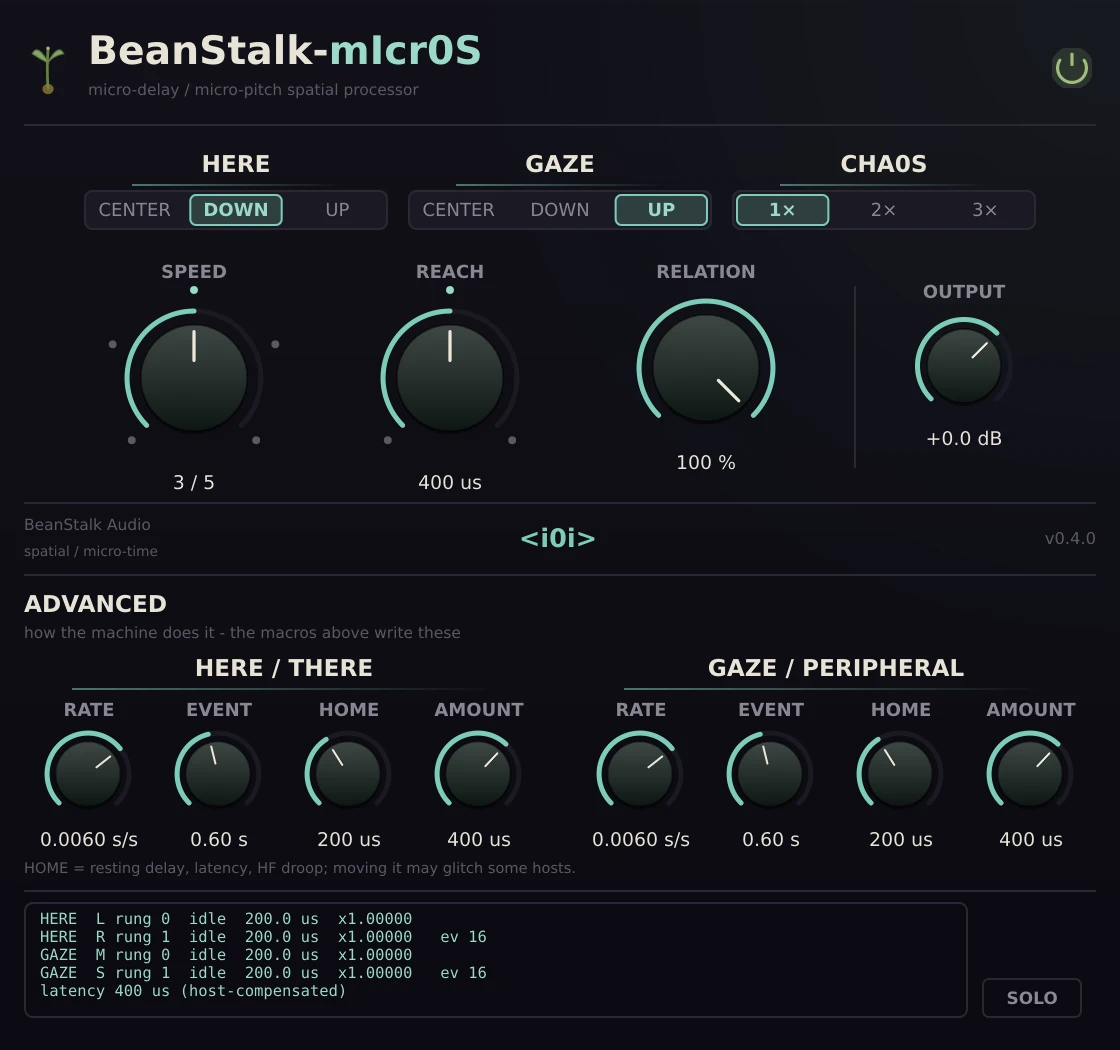
The <i0i> markfooter, dead centreOpens the advanced drawer: Rate, Event, Home and Amount for each domain, live diagnostics, and SOLO.
SOLOdrawerOutputs only what the plugin adds: Relation × (wet − dry). Not a wet-only signal — the resting delay is part of the difference, so it is loud on transients. A monitor, not a mix element.
BYPASSheader power lightGreen while on, dim grey when bypassed. A straight pass-through; the engine keeps running so the timeline stays continuous.
A closer look at the controls
The Interface

Ice-mint and dark. Part of the BeanStalk family.

Four decisions on the face and everything else in a drawer. The whole panel scales as one — every label, knob and toggle grows and shrinks together.
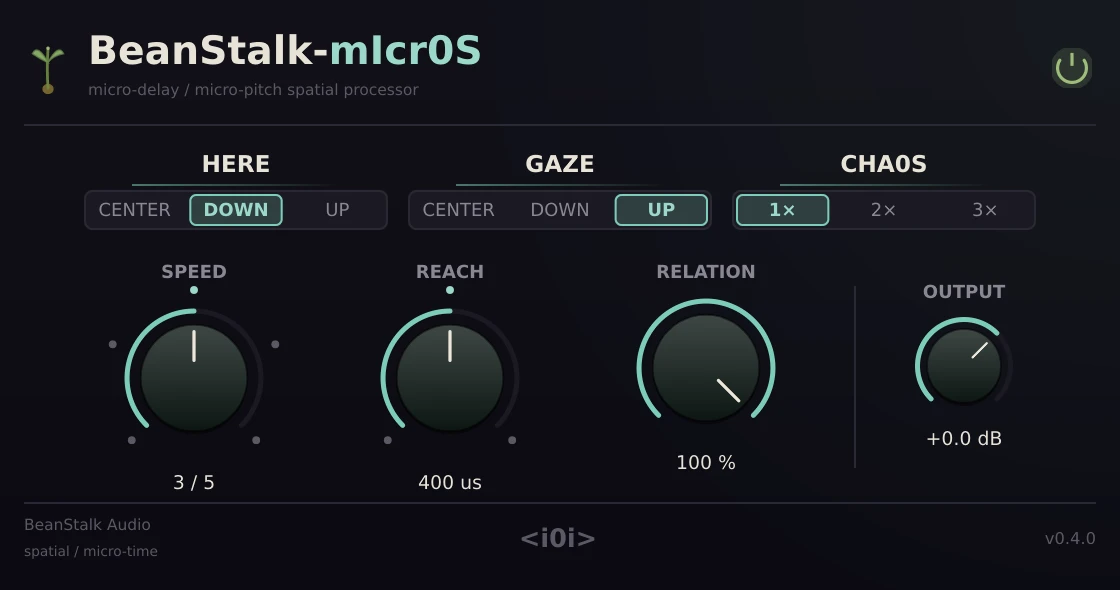
The BeanStalk-mIcr0S front panel: a dark bar with the title in cream and ice-mint, a bean-sprout mark at top-left and a green power light at top-right. Three selector bars: HERE, GAZE and CHA0S. Below them four knobs: SPEED and REACH with detent dots, RELATION, and a smaller OUTPUT. The <i0i> mark sits at the centre of the footer.
The front panel with the readouts shown (a render of the plugin's own editor; demo settings).
The same panel with the advanced drawer open below the footer: Rate, Event, Home and Amount knobs for HERE / THERE and for GAZE / PERIPHERAL, a diagnostics readout, and a SOLO switch.
The <i0i> drawer — the machine behind SPEED and REACH. Same window, just taller.
How to use it

Where it earns its place.

Try it on a stereo mixHERE = Down, GAZE on CENTER, SPEED 2 or 3, REACH 400 µs. Gentle settings are meant to be hard to point at.
Mono sourceHERE creates the width; GAZE does nothing on a mono source. Try REACH 800 µs with a slow SPEED.
Motion on a padSPEED 1 with CHA0S 2×: slow, larger moves that rarely repeat.
FlutterSPEED 5 and REACH 400 µs, HERE = Up: fast, shallow moves.
Check what it's doingOpen the drawer and use SOLO to listen to only the plugin's contribution.
Go deepOpen the drawer and give GAZE its own Rate, Event and Amount. The face then reads “custom”.
A few things to know before you download
What it isn't

Read this before you download.

Not a chorus, widener or pitch shifterThe pitch changes only while a move is in progress and only by cents. It is subtle on purpose.
It reports latencyThe resting delay (HOME, 200 µs per domain by default) is reported to the host: about 400 µs at defaults. Some hosts re-initialise when HOME changes, which can glitch.
It rolls off a little top endThe fractional delays are interpolated, and the very top loses level — about −8 dB at 15–20 kHz at the default HOME (measured).
Fibonacci onlyThe ladder is Fibonacci. There are no LIFE detectors, no external residue input and no lock/unlock control in this version.
Early releasev0.4.0 of the new interface. The DSP has been measured and tested, but it has not been run in every host.
Technical details and verified specs
Technical

Verified specifications.

FormatsVST3 · Standalone application
Operating systemsWindows (64-bit) · Linux (64-bit)
ChannelsStereo or mono, in and out
LatencyReported: HOME here + HOME gaze (400 µs at defaults)
ProcessingDouble precision inside the plugin; 4-point fractional delay
Delay rangeHome 0 – 1000 µs plus a move of up to 800 µs (× CHA0S), inside a 4 ms buffer
CPU≈ 0.3 % of one core at 48 kHz (repo audit, 2026-10-02)
BypassStraight pass-through
AutomationEvery parameter is host-automatable; SPEED and REACH write the underlying parameters
BuildsTwo tiers per platform: a legacy VST3 for any 64-bit CPU, and a VST3 + Standalone build for CPUs with AVX2
Version0.4.0

The signal slightly disagrees with itself.

mIcr0S is pay-what-you-want, and free is a fair price. Micro-delay and micro-pitch on the Fibonacci ladder — VST3 and Standalone, Windows and Linux. More platforms may follow.

Get mIcr0S on Gumroad

More BeanStalk plugins

See all plugins →